
Forum Replies Created
Check out all your contributions and responses across the community.
-
AuthorPosts
-
 Keymaster
Yes sir, that’s exactly the purpose of the ChartInk feature.
ChartInk integration allows you to connect your ChartInk scanners directly with AlgoDelta and automate order execution based on the stocks generated by your scans.
Here’s how it works:
- You create your scanner in ChartInk.
-ChartInk sends the stock list and Buy/Sell signals through a webhook.
-AlgoDelta receives those signals and processes them automatically.
You can use it in two ways:
<h3>Option 1: </h3>
Create a predefined stock list inside your ChartInk Group in AlgoDelta.And then enable the option called : “Place Listed Stocks”
In this case, orders will be placed only for the stocks that are present in both places:
-Your configured ChartInk Group
-The stock list received from the ChartInk scanner
For example:
If your ChartInk Group contains:
-RELIANCE
And the scanner sends:
-ADANIPOWER
-TCS
Then no order will be placed because RELIANCE is not present in the scanner result.
But if the scanner sends:
-RELIANCE
-ADANIPOWER
Then the order will be placed only for RELIANCE because that is the stock common in both lists.
<h3>Option 2 : </h3>
In this is you disable the option called : “Place Listed Stocks”Now in this you don’t have to configure any stock list in the ChartInk Group, the AlgoDelta will place orders for all the stocks received from the ChartInk scanner.
For example:
If the scanner sends:
-RELIANCE
-ADANIPOWER
-TCS
Then orders will be placed for all three stocks automatically.
So in simple terms:
-TradingView → Sends signals from indicators or strategies.
-ChartInk → Sends stocks generated from scanner conditions.
AlgoDelta receives those signals and can automatically execute the trades based on your configured setup.
-> If you are already familiar with JSON Bridge and TradingView integration, you can think of the ChartInk feature as a similar automation flow, but instead of TradingView signals, the signals come from ChartInk scanners.
KeymasterThis is a very common confusion when using groups for the first time.
The behavior depends on how the trade is being triggered.
If you are using:
-JSON Bridge
-Custom Bridge
-Order Manager
and you select a group there, then the orders will be placed only in the Child accounts connected to that group.
The Master account is not used for execution in this case.
-> So if you’re using JSON Bridge or Order Manager and selecting a group, don’t worry if you don’t see orders in the Master account. That is the expected behavior, and the execution will happen only in the Child accounts linked to that group.
KeymasterYes, definitely.
You can do this using either:
-Order Manager
-JSON Bridge
Both support automatic position exit based on time.
For this example, I’ll show it using Order Manager.
Step 1 : Go to the Order Manager.
Click: “+ Add Order Group”
If you don’t have a group already, create Group first and select it or you can connect the individual account also.
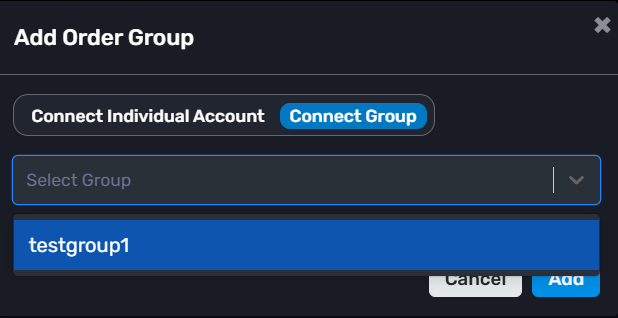
Step 2 : Click: “+ Add Position”
Now configure your trade.
-> Example:
-Already Open: Disable
-Transaction Type: Buy
-Segment: Future
-Script: ADANIPOWER26JUNFUT
-Order Lot: 1
-Product: Carry Forward
-Order Entry Type: Direct
Step 3 :
Enable the end time filed at the right upper of the pop up.
-End Time: 15:15:00
You can also configure:
-Start Time
-Target
-Stop Loss
-Trailing Stop Loss
Then click Add.
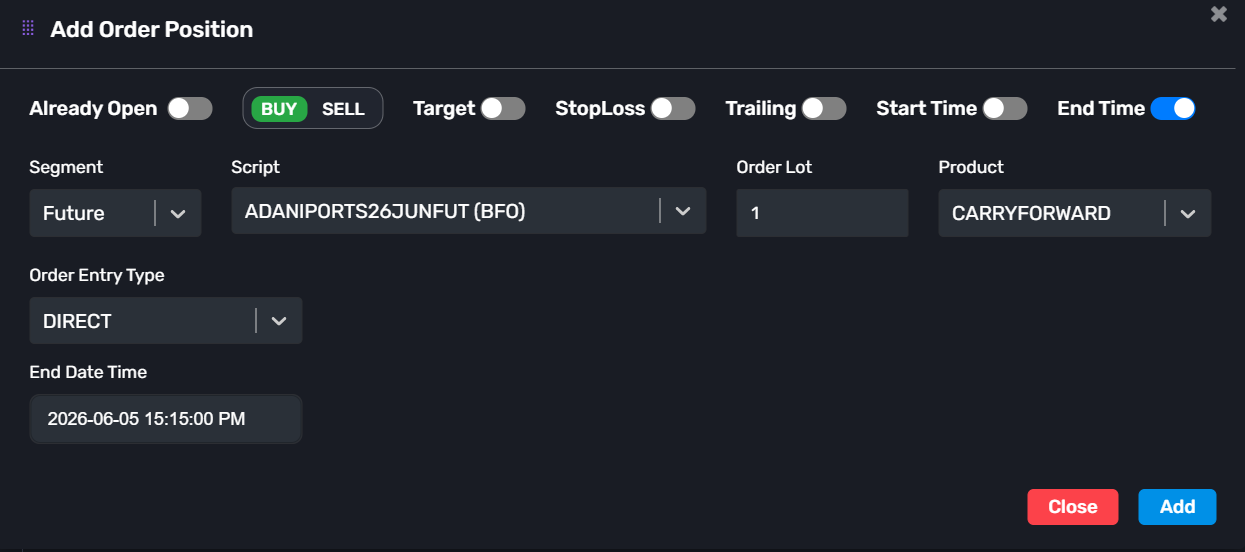
That’s it.
When the configured End Time is reached, AlgoDelta will automatically exit the position for you.
So if you set the End Time to 3:15 PM, the trade will be closed before the broker’s auto square-off process starts.
-> This is very useful for intraday traders who don’t want to manually monitor and exit positions every day.
Note : Orders will only be managed in the child accounts connected to the selected group.
KeymasterDon’t worry sir, the setup is quite simple and only takes a few clicks.
Step 1 :
Go to the Groups section and click: “+ Add Group”
Enter any group name you want and create the group.
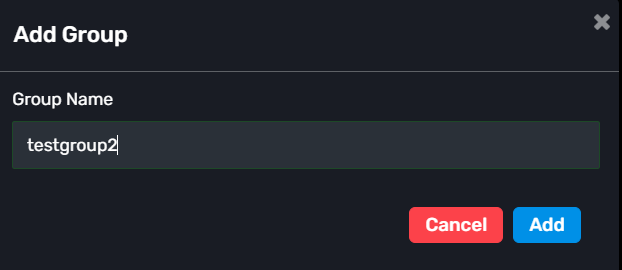
Step 2 :
Select a Master Account.
You can choose any connected account as the Master account.
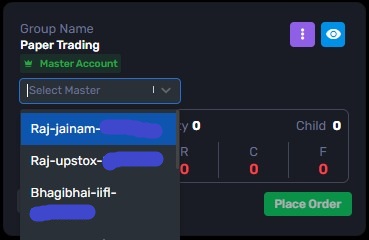
If your account is not connected yet, connect the Demat Accounts section. You can refer this blog: Connect demat account
Step 3 :
After creating the group, click on the View option (eye icon).
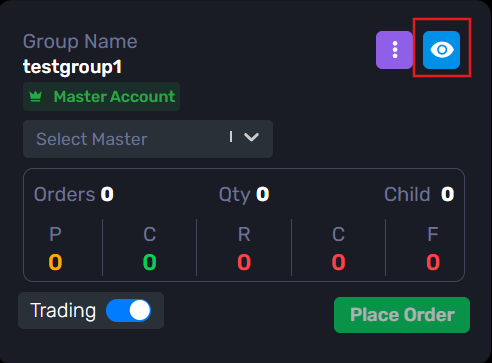
Inside the group, click: “+ Add Child”
Now select the accounts that you want to add as Child accounts.
You can add one or multiple child accounts.
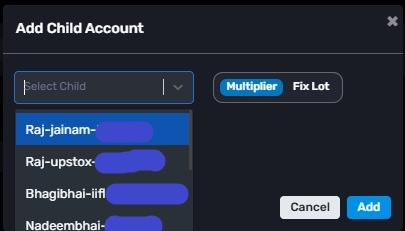
Step 4 :
Save the changes.
That’s it.
Now whenever you use this group in features like:
-Order Manager
-JSON Bridge
-Custom Bridgethe trades will automatically be executed in all the child accounts connected to that group.
-> In simple terms, the Master account manages the setup, and the actual orders are placed in the Child accounts linked to the group.
KeymasterA Zerodha account using the API is generally used when you want to set Zerodha as the master account. In this case, you will need to log in daily, and a static IP is required.
A Zerodha account without using the API is generally used when you want to set Zerodha as a child account. In this case, there is no need for daily login, and a static IP is not required. However, if you log in to your Zerodha portal, it may log you out after 2–5 minutes. This will not affect the multi-account management system.
KeymasterYes, this confusion is very common when setting up a Static IP for the first time.
After purchasing the Static IP, you need to register it inside your Angel One SmartAPI application.
Just follow these steps:
Step 1: Login to the Angel One SmartAPI portal.
Step 2 : On the home page, click: Add App
Step 3 : Fill the application details.
Example:
App Name: AlgoDelta App
Redirect URL: https://algodelta.com/platform/dematconnected</span>
Postback URL: https://algodelta.com/platform/dematconnected</span>
Primary Static IP: Paste the Static IP copied from AlgoDelta
Secondary Static IP: Optional
Step 4 Click: Add
That’s it.
Your Static IP will now be registered with Angel One for API-based order execution.
-> For a detailed step-by-step guide with screenshots, you can check our dedicated Angel One setup guide:
Angel One Static IP Setup Guide
This guide covers the complete registration process with images and examples.
KeymasterYes, you can definitely do that using the JSON Bridge.
The main difference is that indicator-based trading requires two separate alerts — one for LONG signals and one for SHORT signals.
<h3>Step 1</h3>
Go to the JSON Bridge and click:Generate Syntax
Configure your trade settings.
Example:
- Order Type: Strategy Order
- Script Type: Future
- Symbol: NIFTY-N (NFO)
- Expiry Gap: 0
- Product: Carry Forward
- Quantity: 1
- Transaction Type: Buy / Sell
You can also configure:
- Exit on Opposite
- Stop Loss
- Target
- Rollover
After configuration, copy the generated JSON syntax.
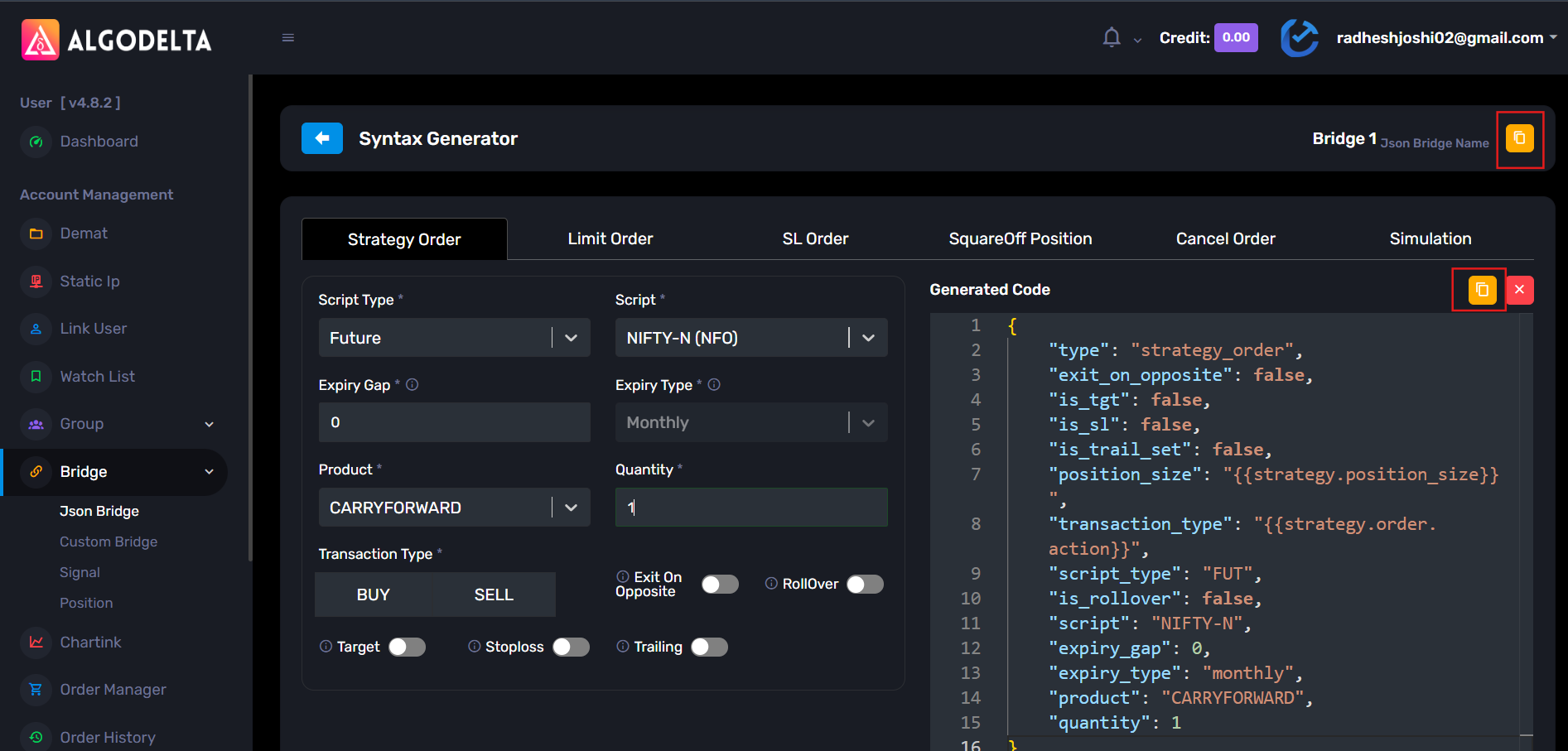
Step 2: Copy the webhook URL from the JSON Bridge.
Step 3 : Open TradingView and apply your indicator on the chart.
Then create a new alert.
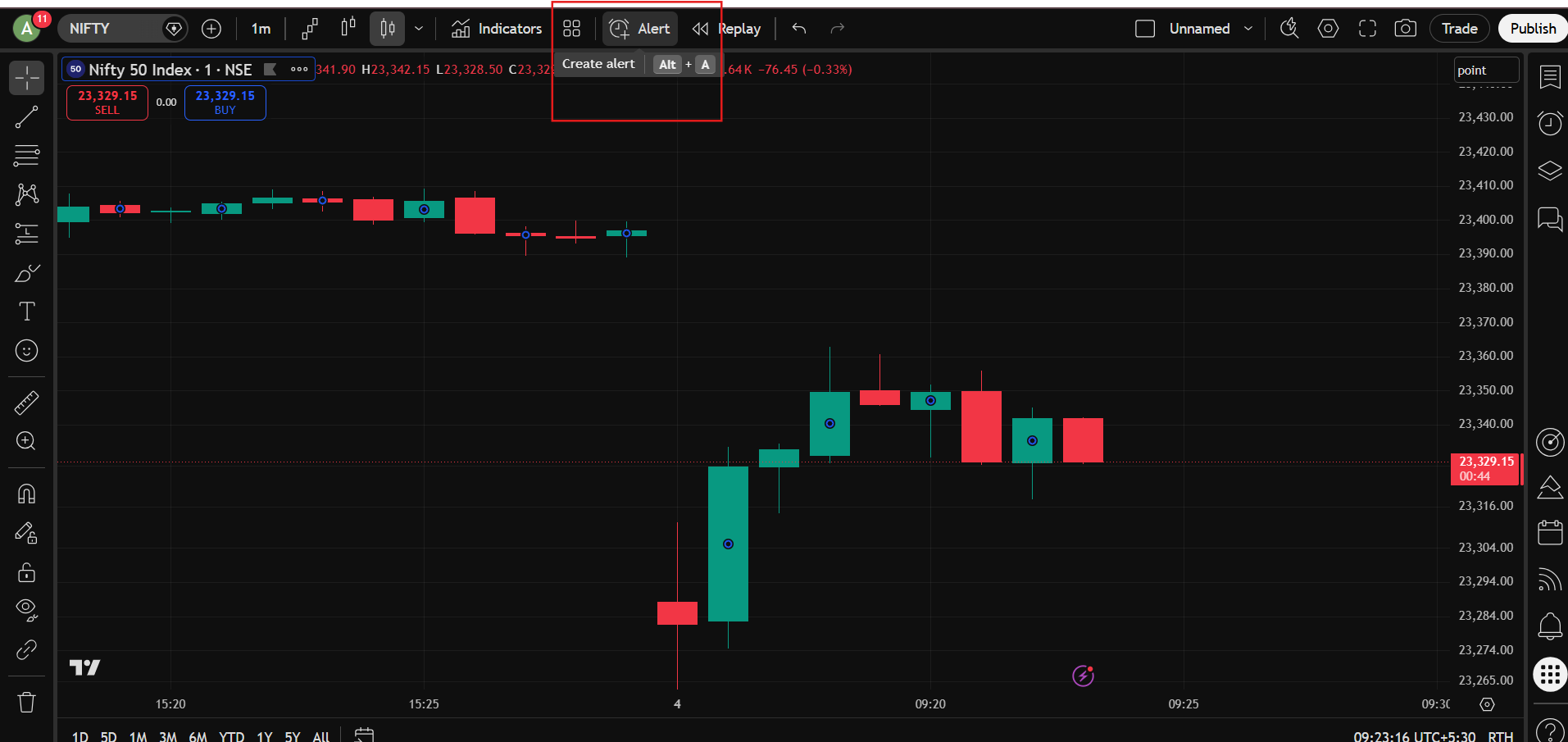
Step 4 :In the Condition dropdown, select your indicator.
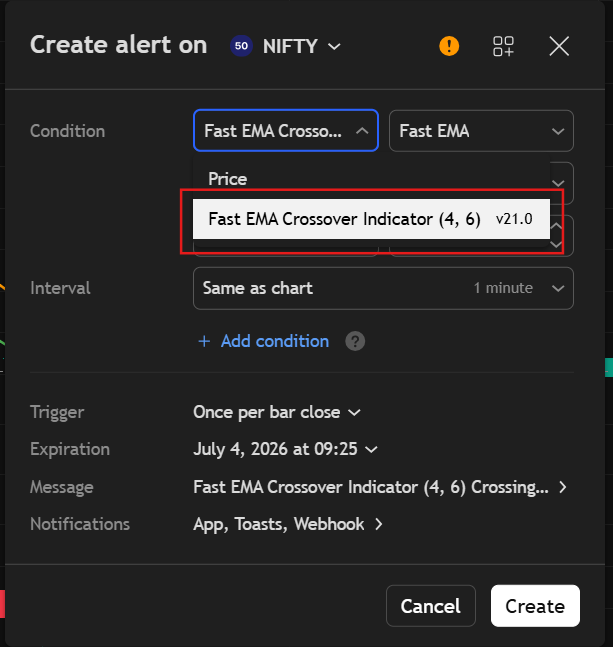
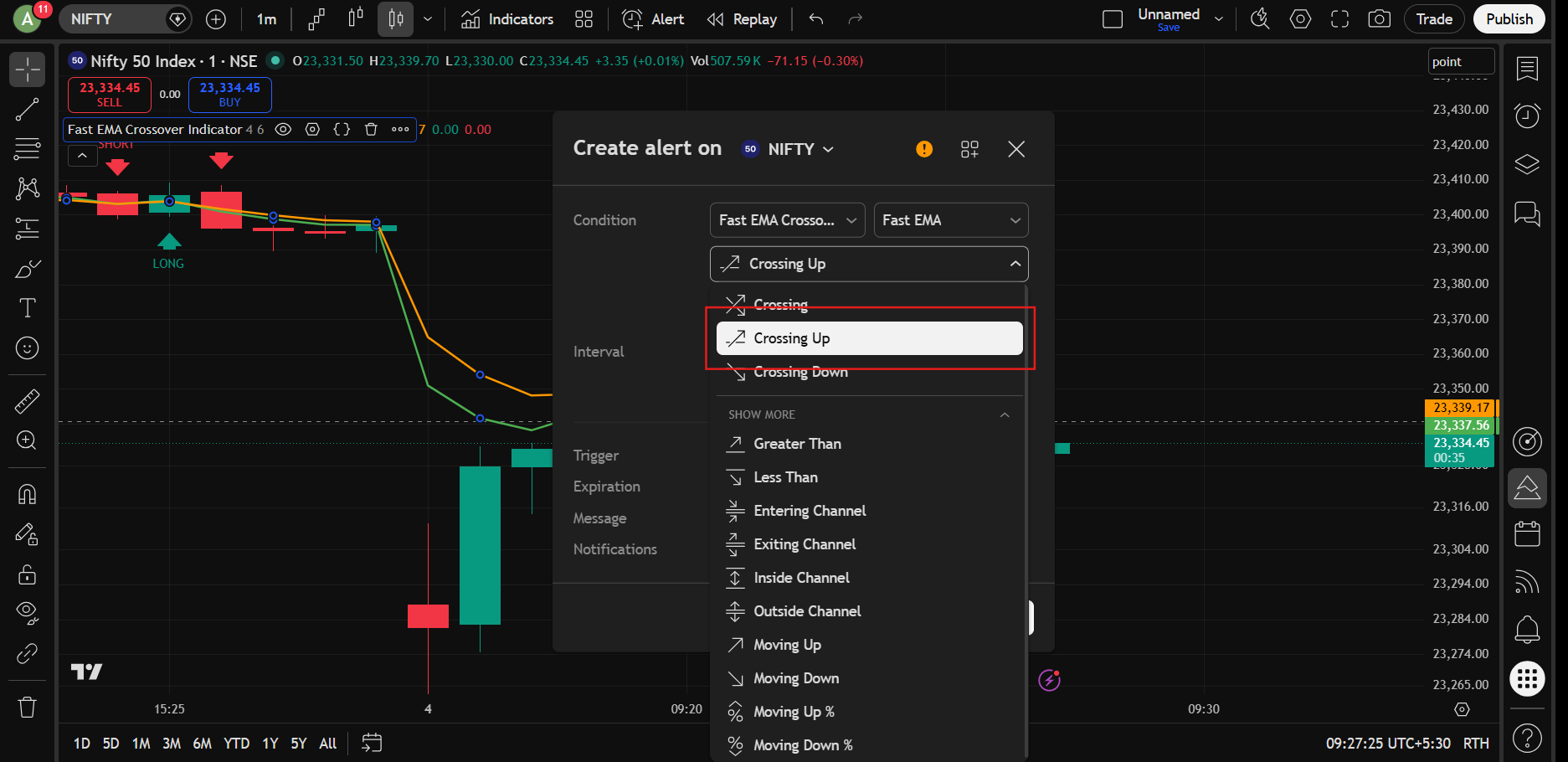
Step 5 : For the first alert, select: Crossing Up : This will be your LONG signal alert.
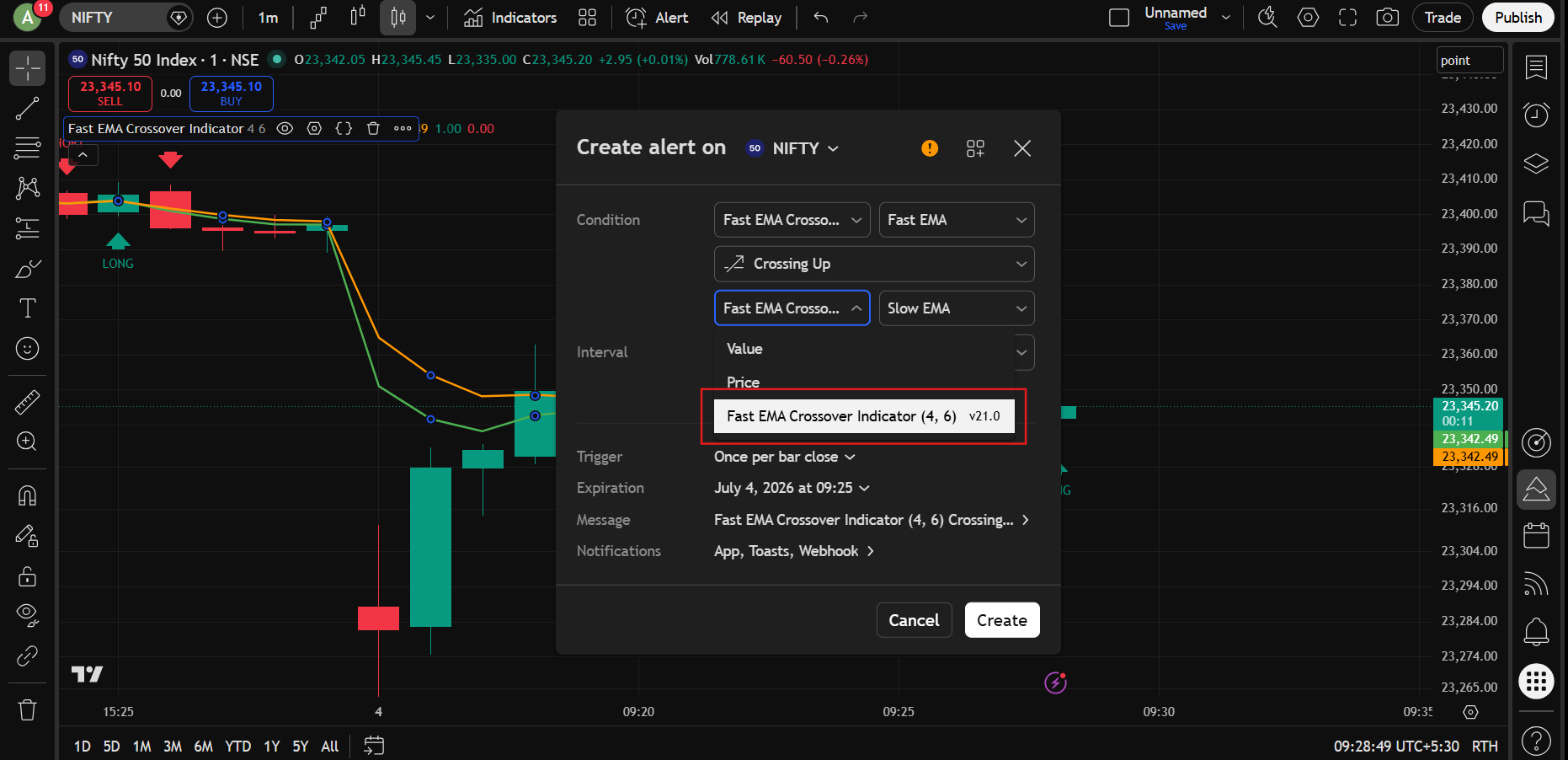
Step 6 : In the Value dropdown below, select the same indicator.
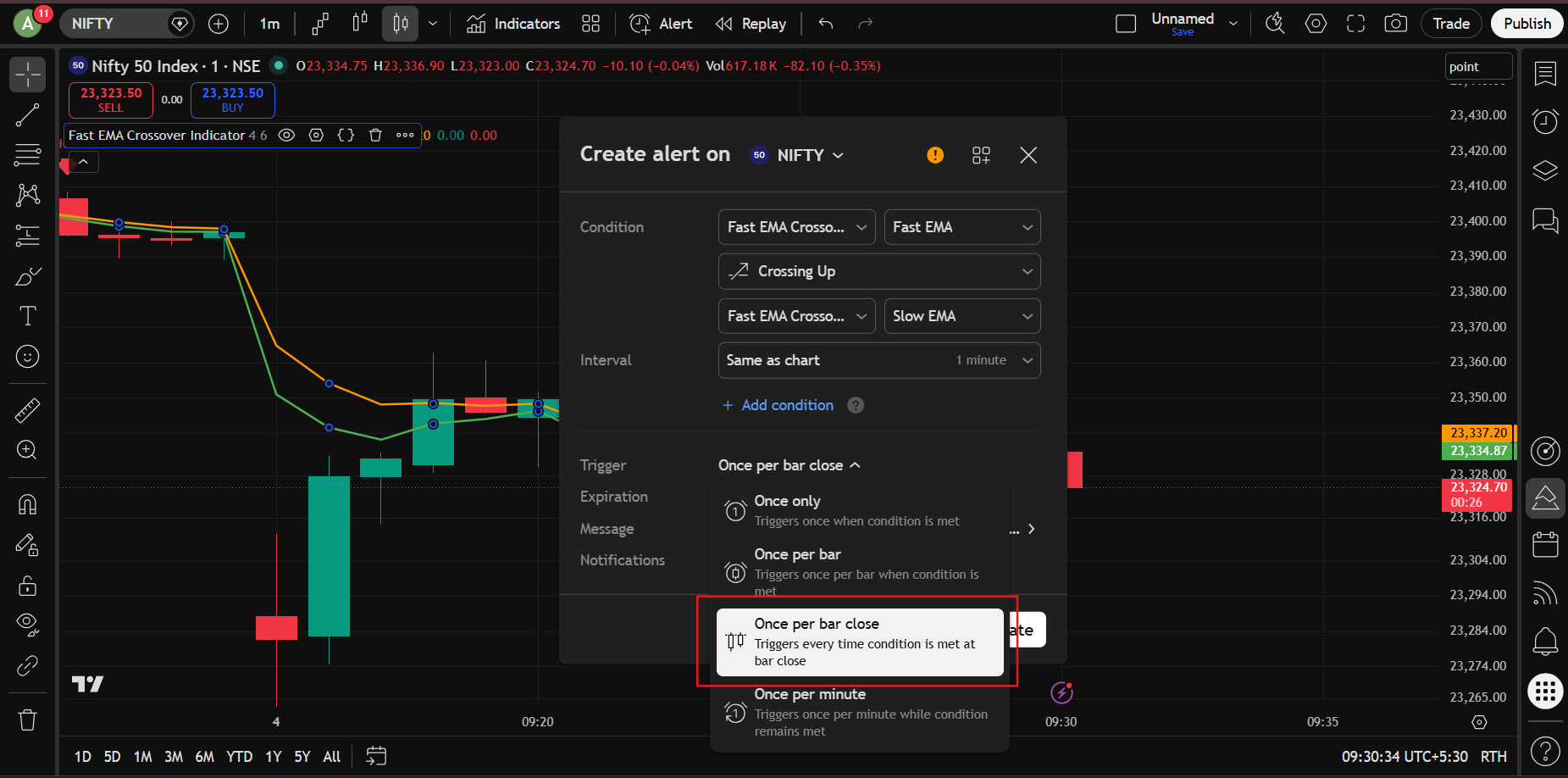
Step 7 : In the Trigger option, select: Once Per Bar Close :
This is generally recommended to avoid false signals.
Step 8 : Give any alert name you want.
In the Message section, paste the JSON syntax generated from the JSON Bridge. Click Apply.
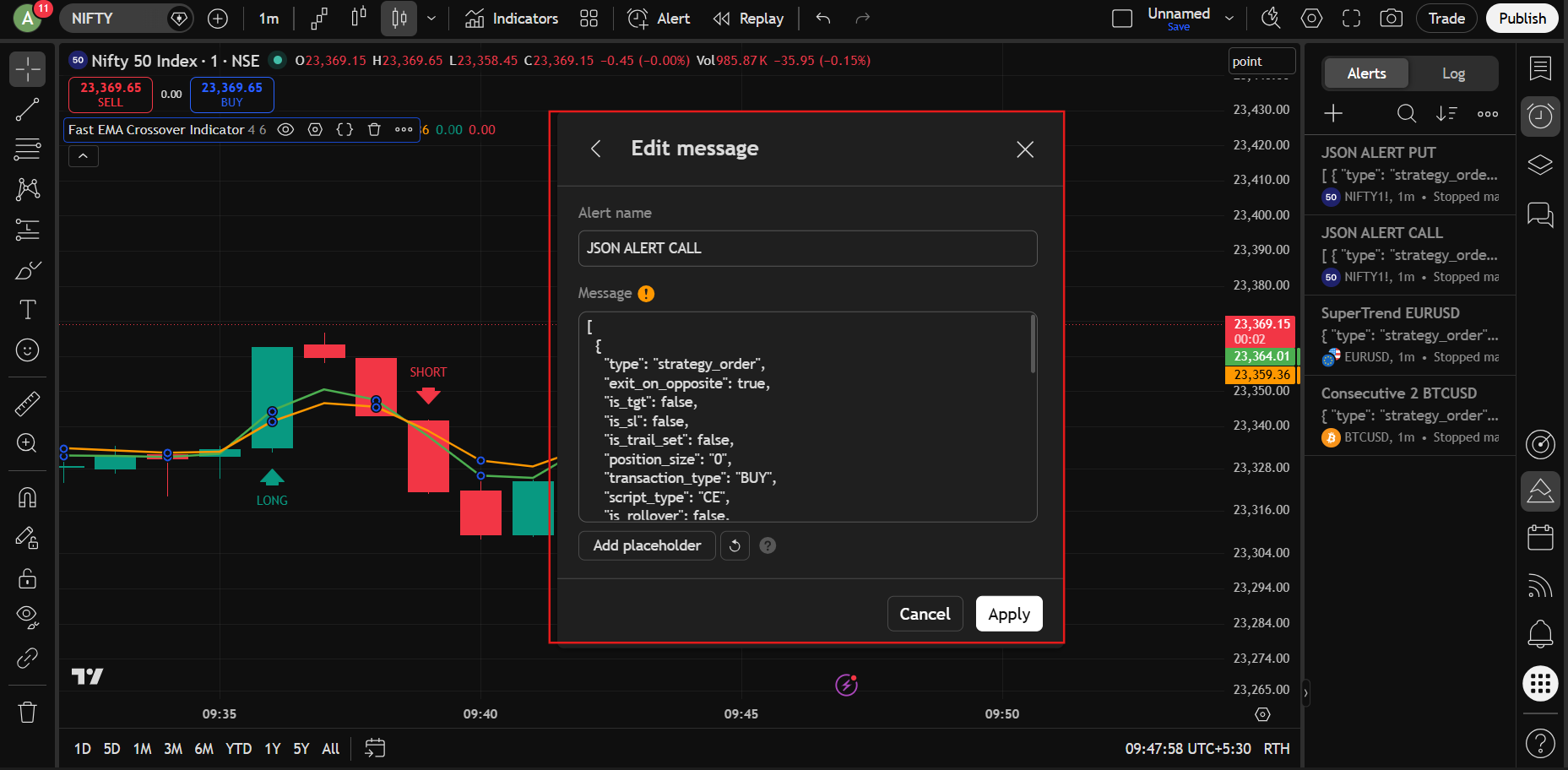
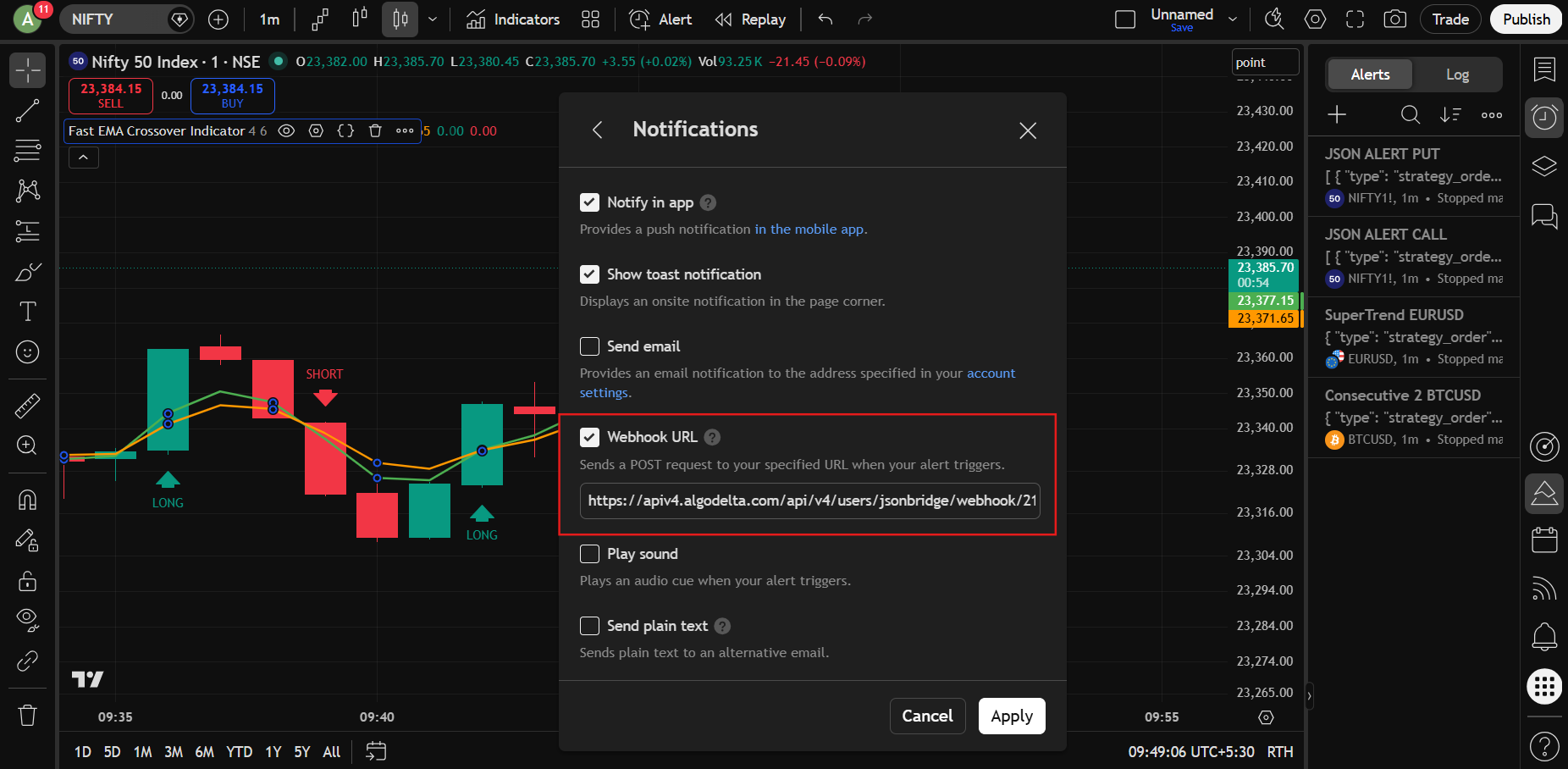
Step 9 : Open the Notifications section.
- Enable Webhook URL
- Paste the webhook URL copied from the JSON Bridge
Then click Create
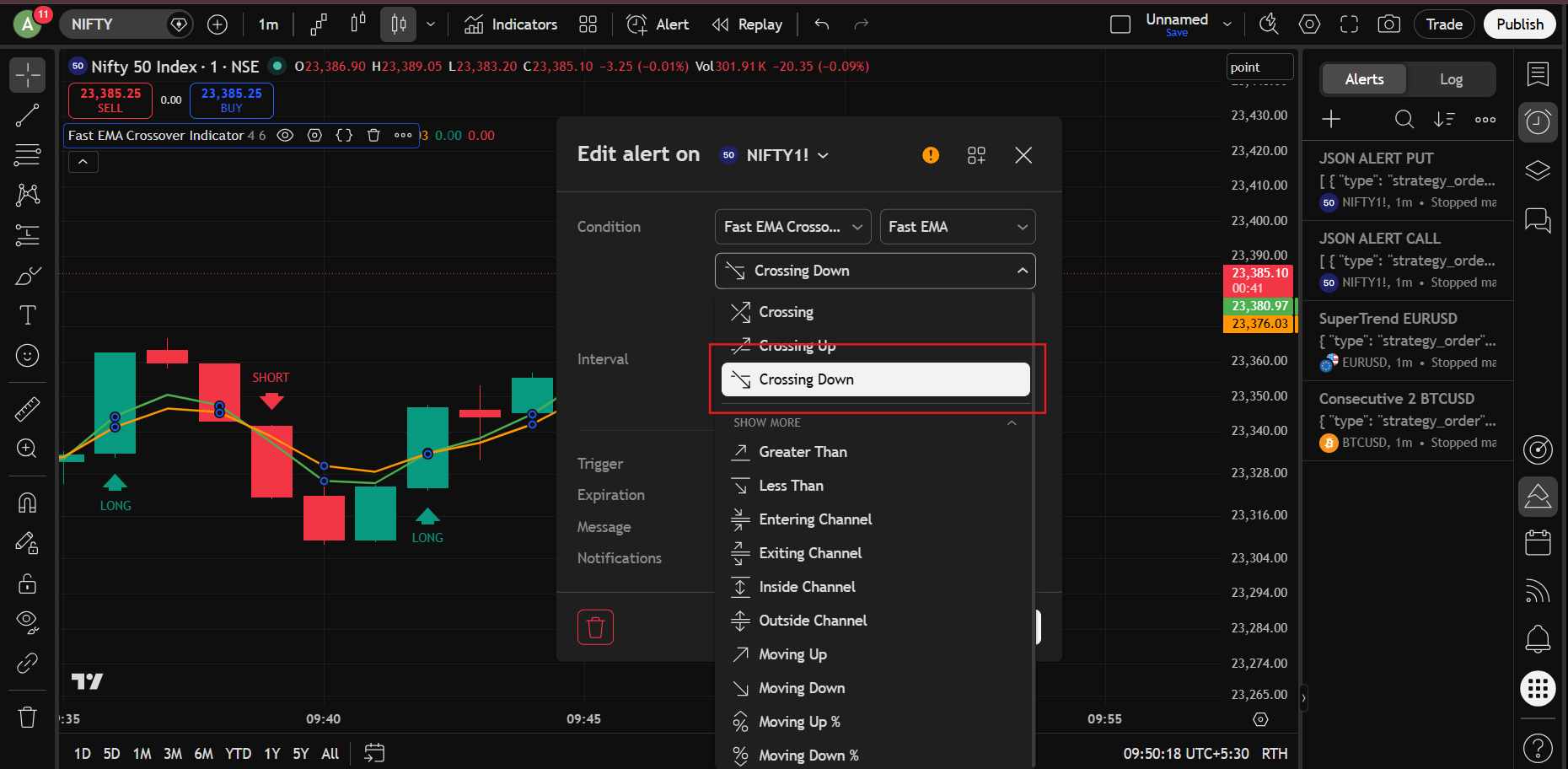
Step 10 : Now create a second alert.
Keep everything exactly the same except:
Crossing Up
should be changed to:
Crossing Down
This will become your SHORT signal alert.
That’s it.
Now:
- When the indicator generates a LONG signal → Futures BUY order will be placed
- When the indicator generates a SHORT signal → Futures SELL order will be placed
KeymasterYes, this is a common issue that many traders are facing recently.
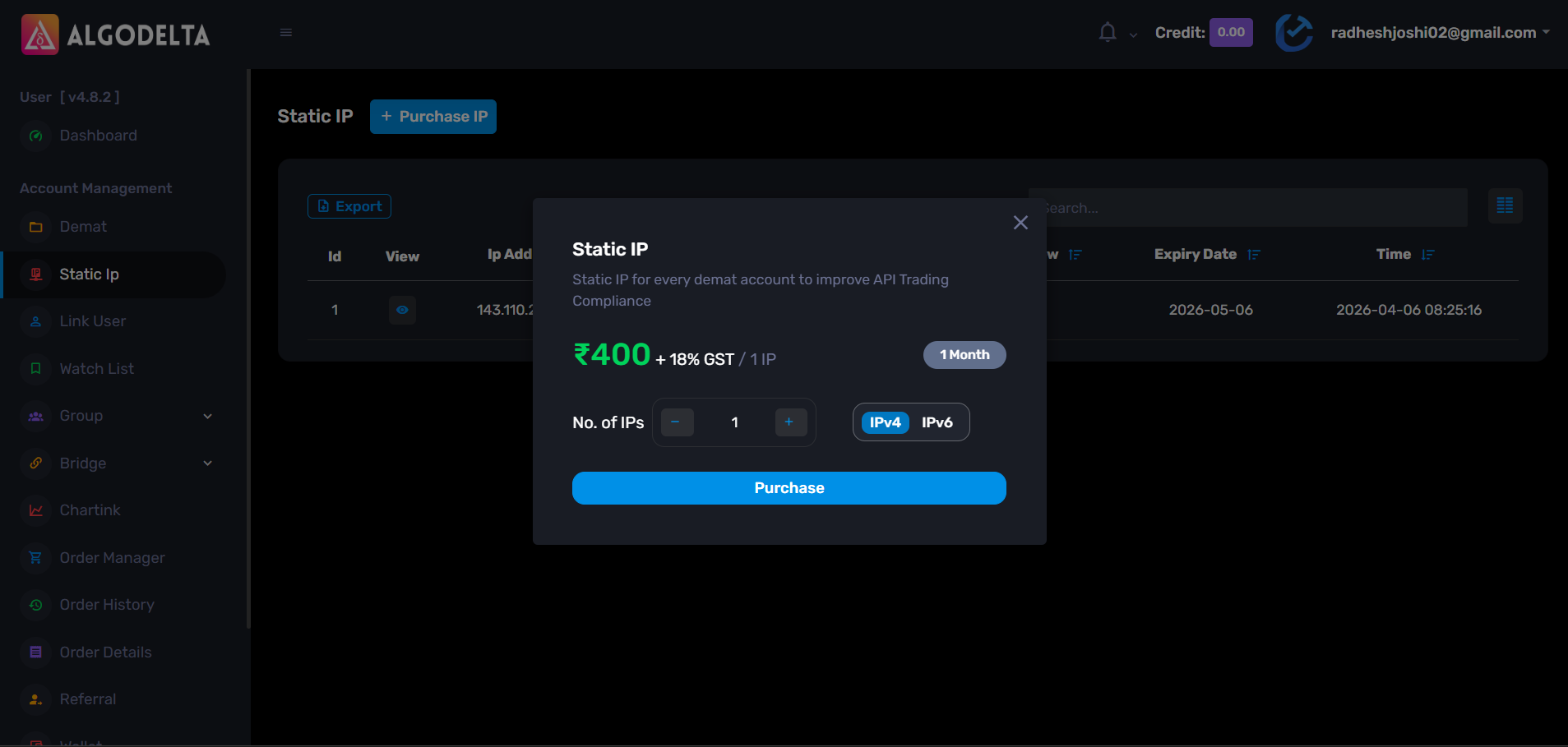
As per the latest broker and regulatory requirements, orders can only be placed from a registered (whitelisted) Static IP address. If your IP is not registered with the broker, orders may get rejected with an “IP Not Whitelisted” error.
To resolve this issue, you need to:
• Purchase a Static IP
• Register the Static IP with your broker
• Update the IP details in your broker setupWith AlgoDelta, this process is much simpler. You can add your broker account, purchase a Static IP directly from the platform, and follow the setup process to whitelist it with your broker.
Once the IP is successfully registered, your orders should start working normally.
If you need any assistance with the setup process, please contact the AlgoDelta Support Team. They will guide you through the complete setup step by step.
 Keymaster
For adding a AC Agarwal broker account, go to Demat → Add Demat and select “propxts“.
Then fill in the following details:
- Nickname
- Number
In both the Login ID and Client ID fields, enter your AC Agarwal Client ID.
For the API Key and Secret Key, you need to contact your Relationship Manager (RM) or the broker’s customer support.
In the Host Lookup URL field, enter:
https://symphony.acagarwal.com:3000/hostlookup
And in the Version field, enter:
1.0.1
KeymasterFor adding a 5paisa broker account, go to Demat → Add Demat and select “propxts“.
Then fill in the following details:
- Nickname
- Number
In both the Login ID and Client ID fields, enter your 5paisa Client ID.
For the API Key and Secret Key, you need to contact your Relationship Manager (RM) or the broker’s customer support.
In the Host Lookup URL field, enter:
https://xtsmum.5paisa.com:4000/hostlookupAnd in the Version field, enter:
1.0.1 KeymasterYes, you can definitely do that with the Json bridge
Just follow these steps:
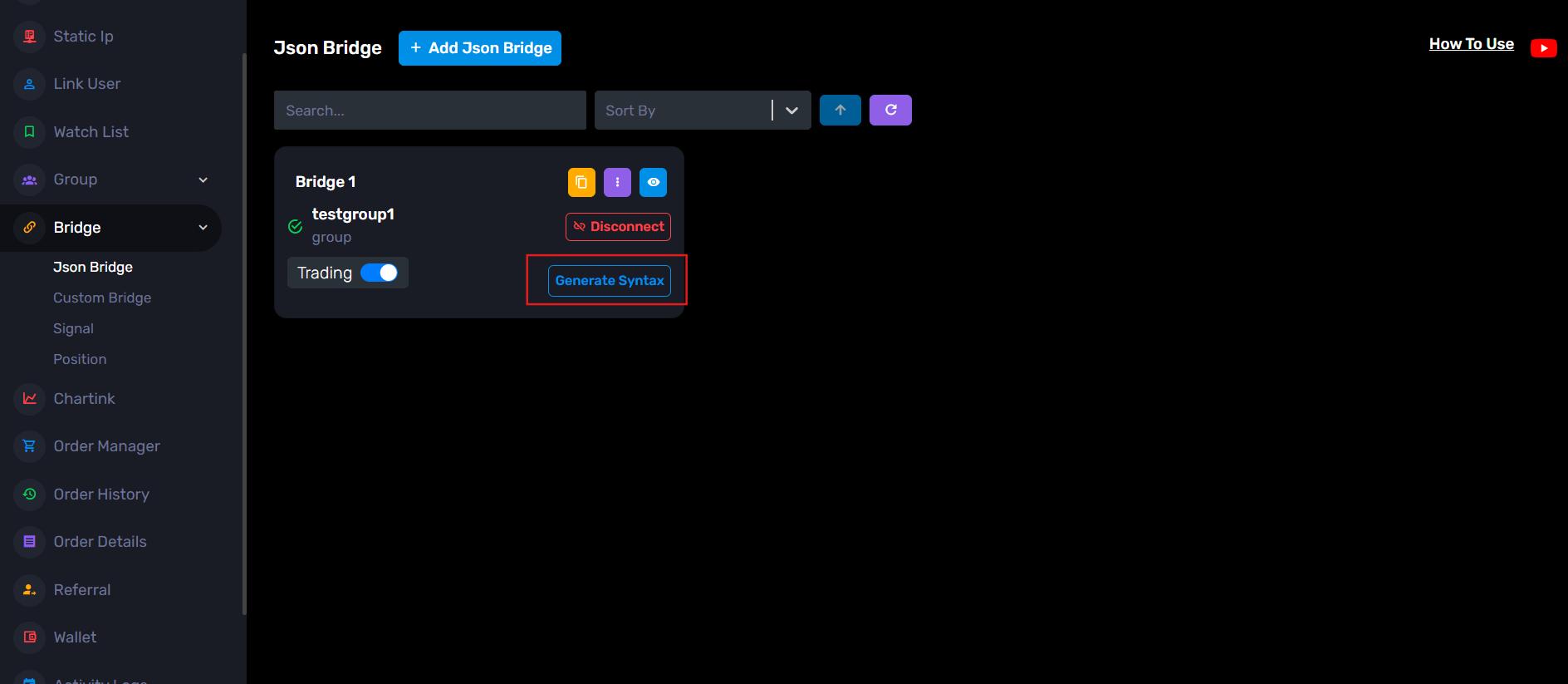
Step 1: Go to the JSON Bridge page and click: Generate Syntax
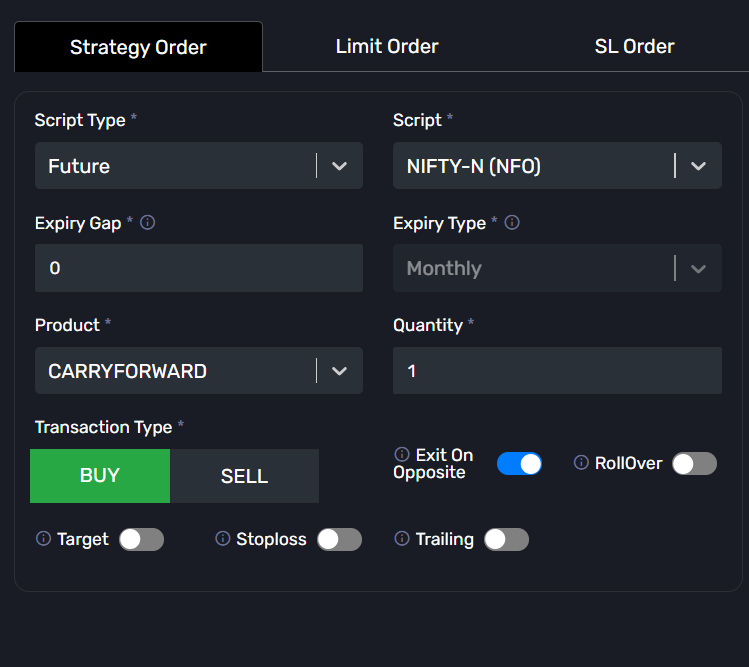
Step 2: Configure your trade settings.
Example:
- Order Type: Strategy Order
- Script Type: Future
- Symbol: NIFTY-N (NFO)
- Expiry Gap: 0
- Product: Carry Forward
- Quantity: 1
- Transaction Type: Buy / Sell
You can also configure optional settings like:
- Exit on Opposite
- Stop Loss
- Target
- Rollover
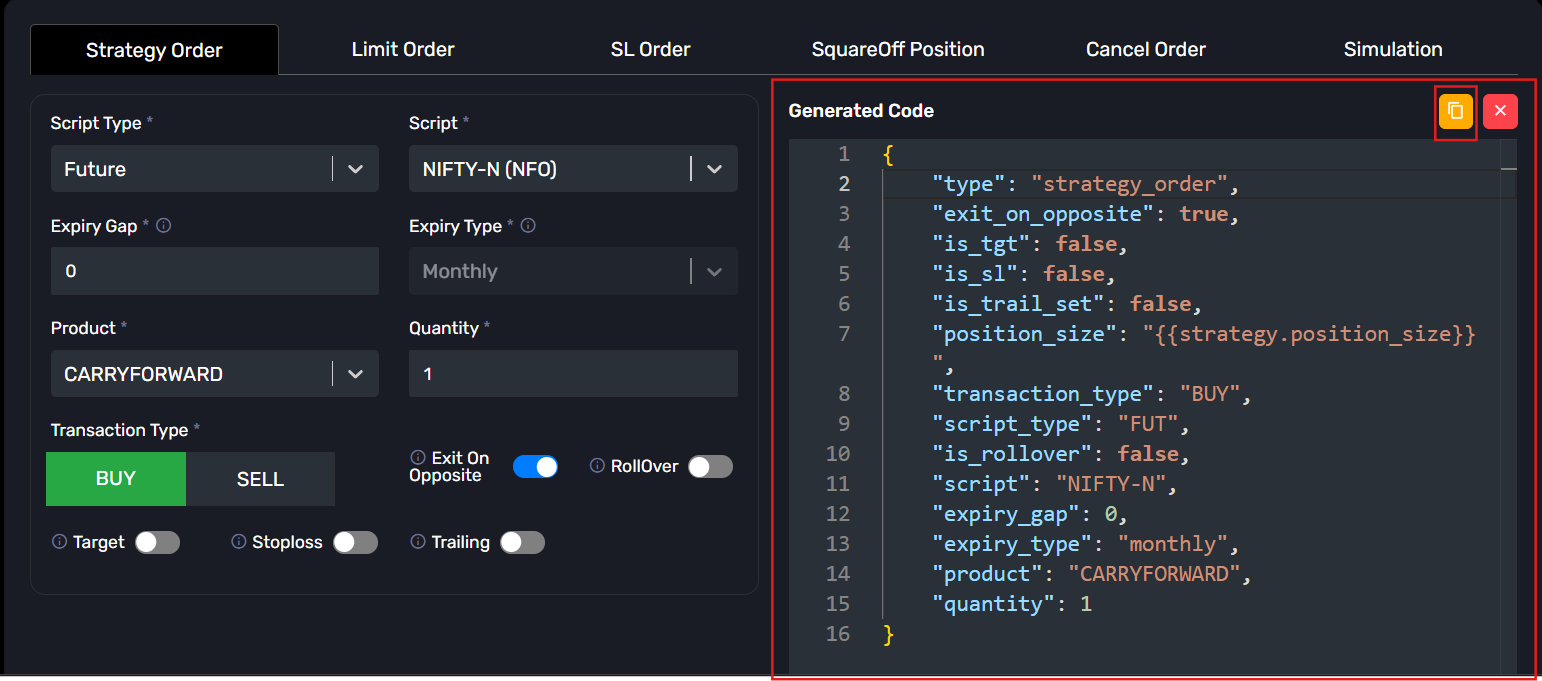
Step 3: After filling the details, the JSON will be generated automatically on the right side.
Copy that JSON.
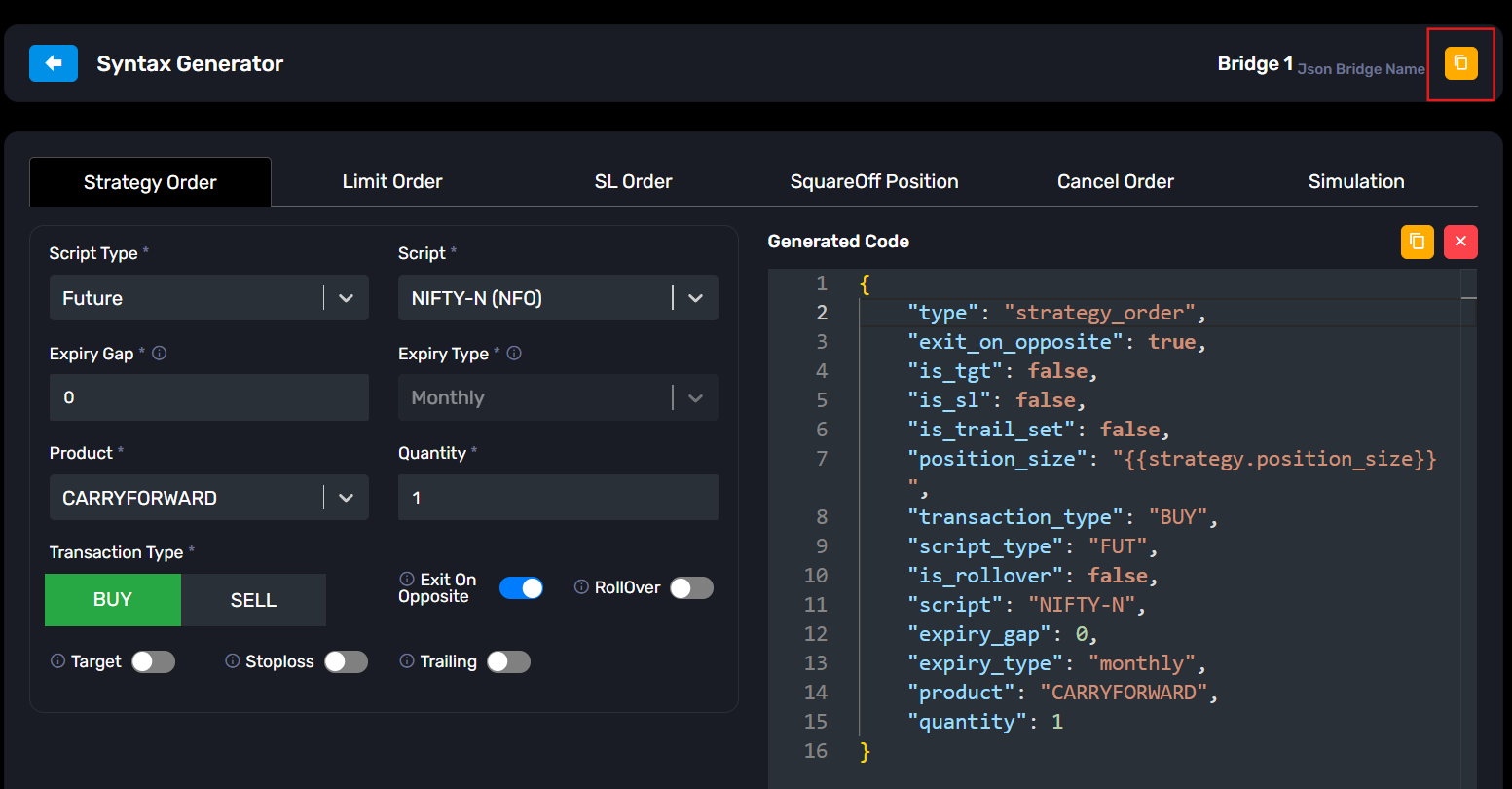
Step 4: Now copy the webhook URL from the yellow copy icon available in the JSON Bridge.
Step 5: Open TradingView and apply your strategy on the chart.
Then create a new Alert.
In the Condition dropdown, select your strategy.
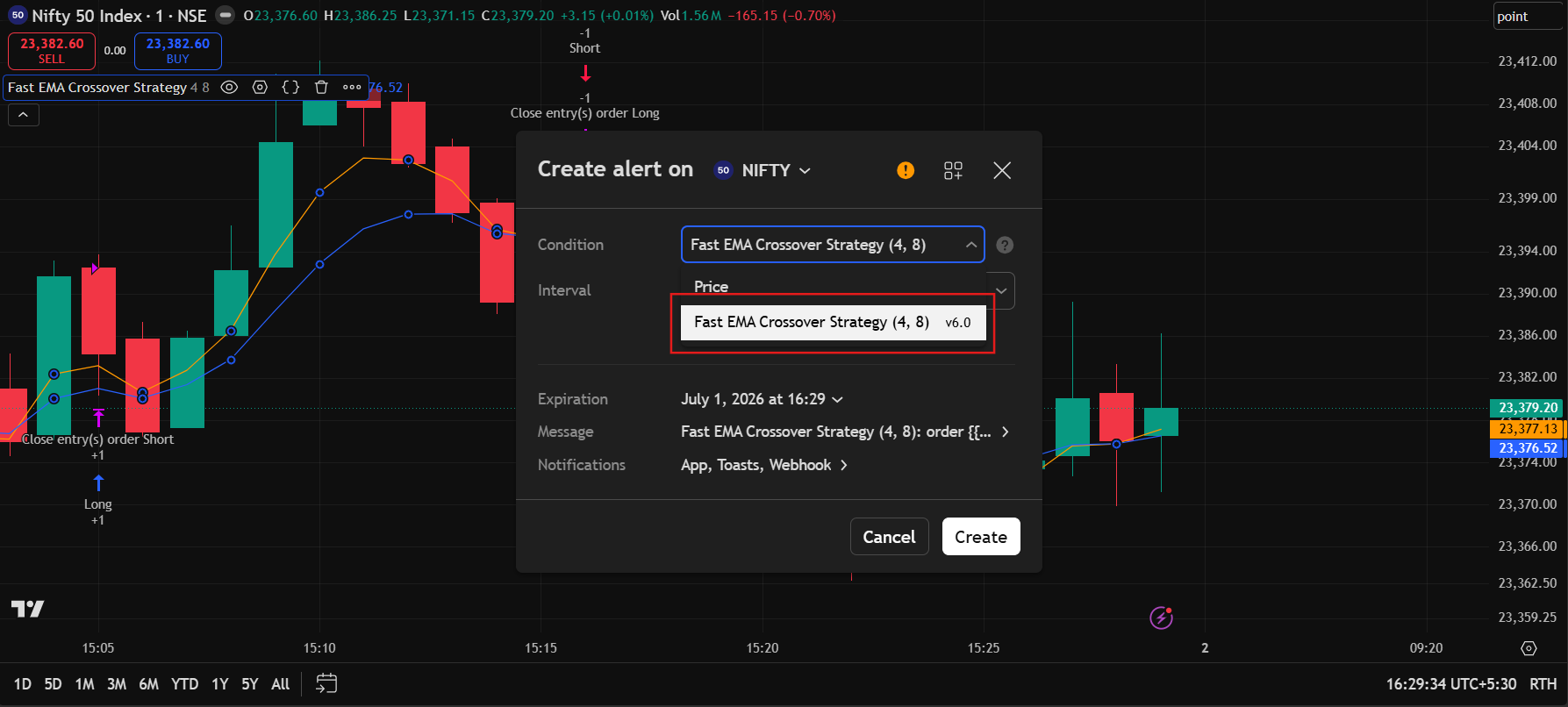
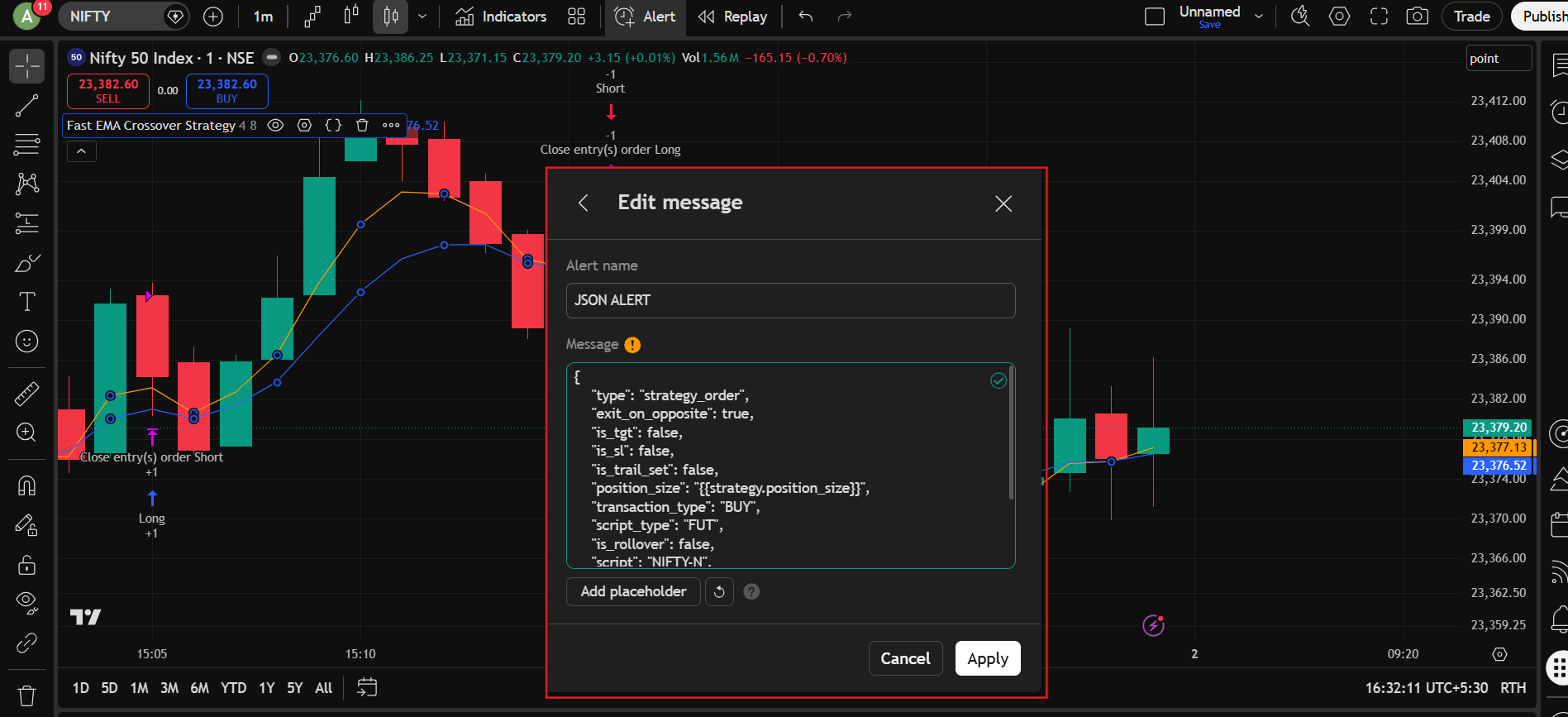
Step 6: Go to the message section:
Give any alert name, for example: JSON ALERT
Now paste the copied JSON into the Message section.
Click Apply.
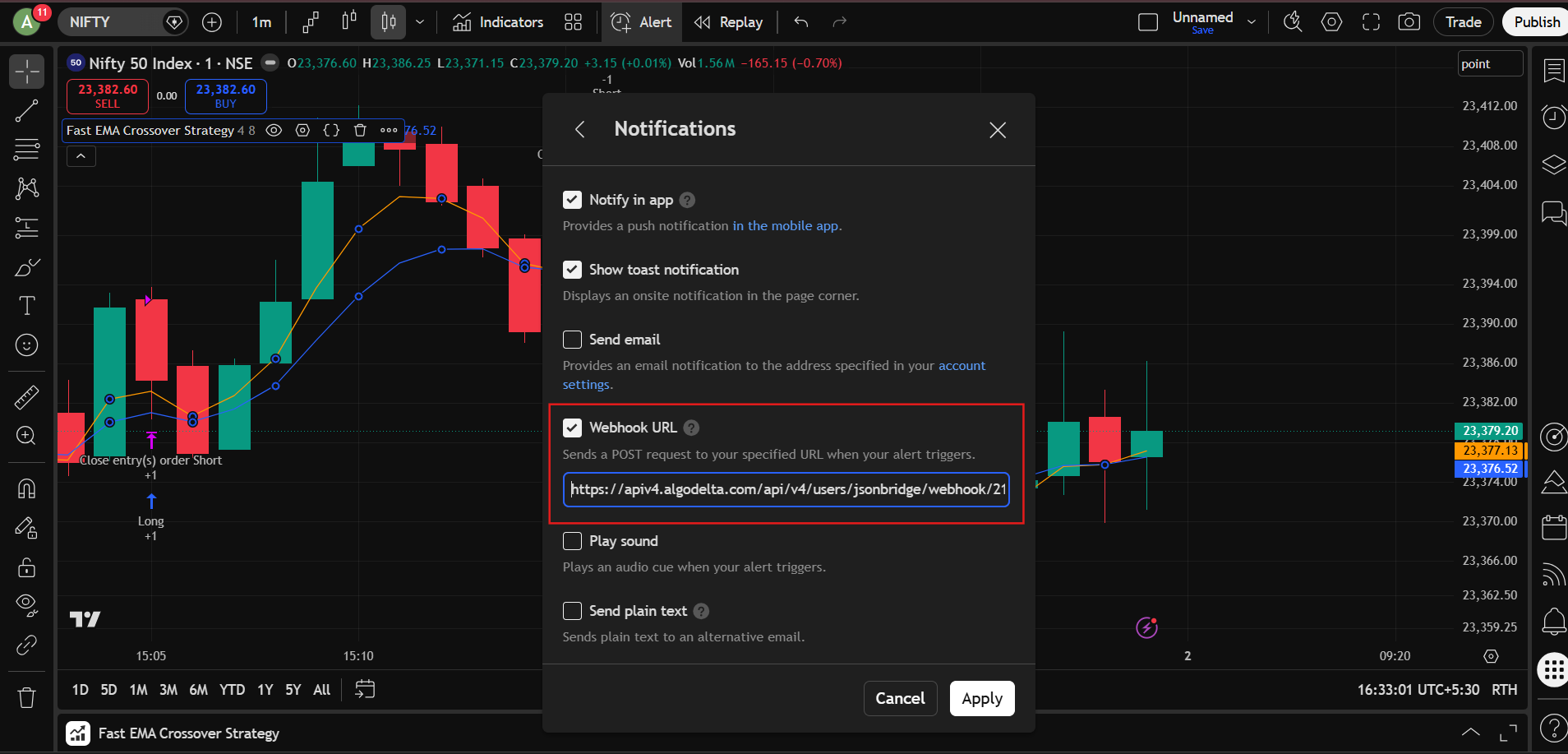
Step 7: Go to the Notifications section.
- Enable Webhook URL
- Paste the webhook URL copied from the JSON Bridge
Then click Apply.
That’s it.
Now whenever:
BUY signal comes from your strategy -> Nifty Future BUY order will be placed.
SELL signal comes from your strategy -> Nifty Future SELL order will be placed.
KeymasterFor paper trading, you just need to create one blank group without adding any master or child accounts. Then, add this group to the Order Manager, TradingView, Chartink, Watchlist, or any other AlgoDelta feature, and you can start paper trading. You will be able to track your P&L without placing any trades in a real trading account.
Below are the steps to start paper trading in AlgoDelta.
1 ) First, go to the “Group/Copy” tab.
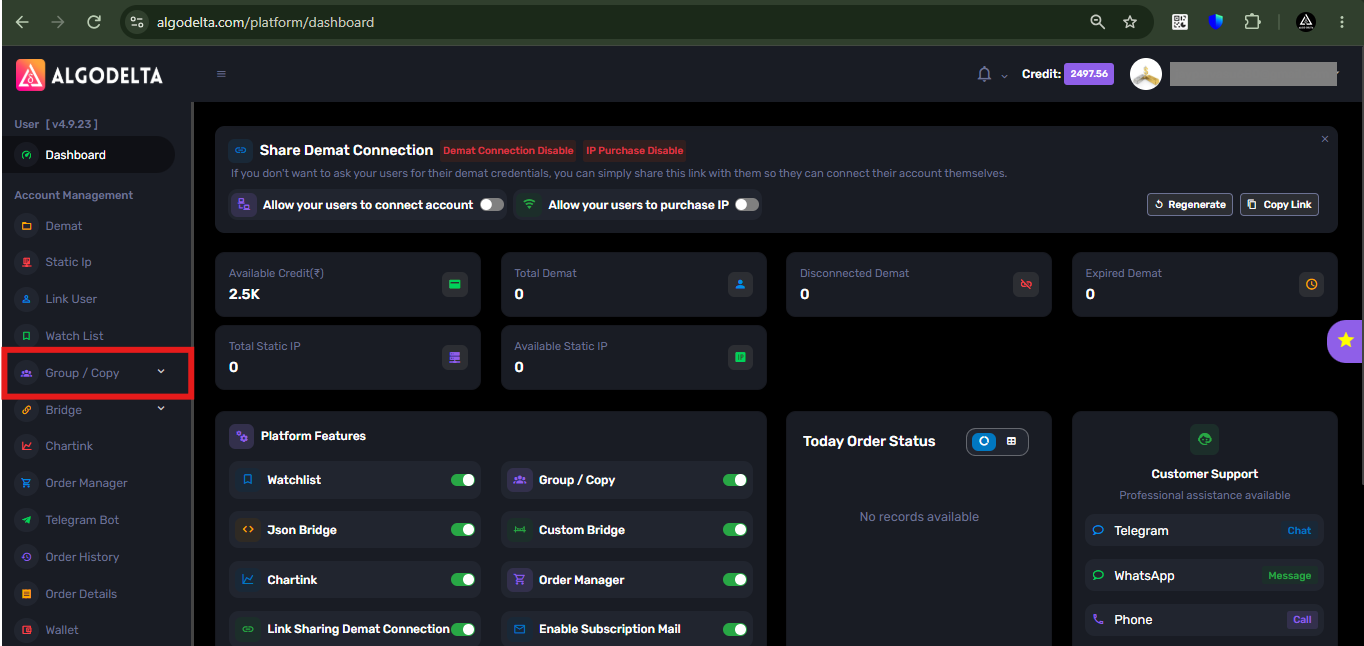
2 ) Then, click on the “Add Group” button and enter any name for the group.
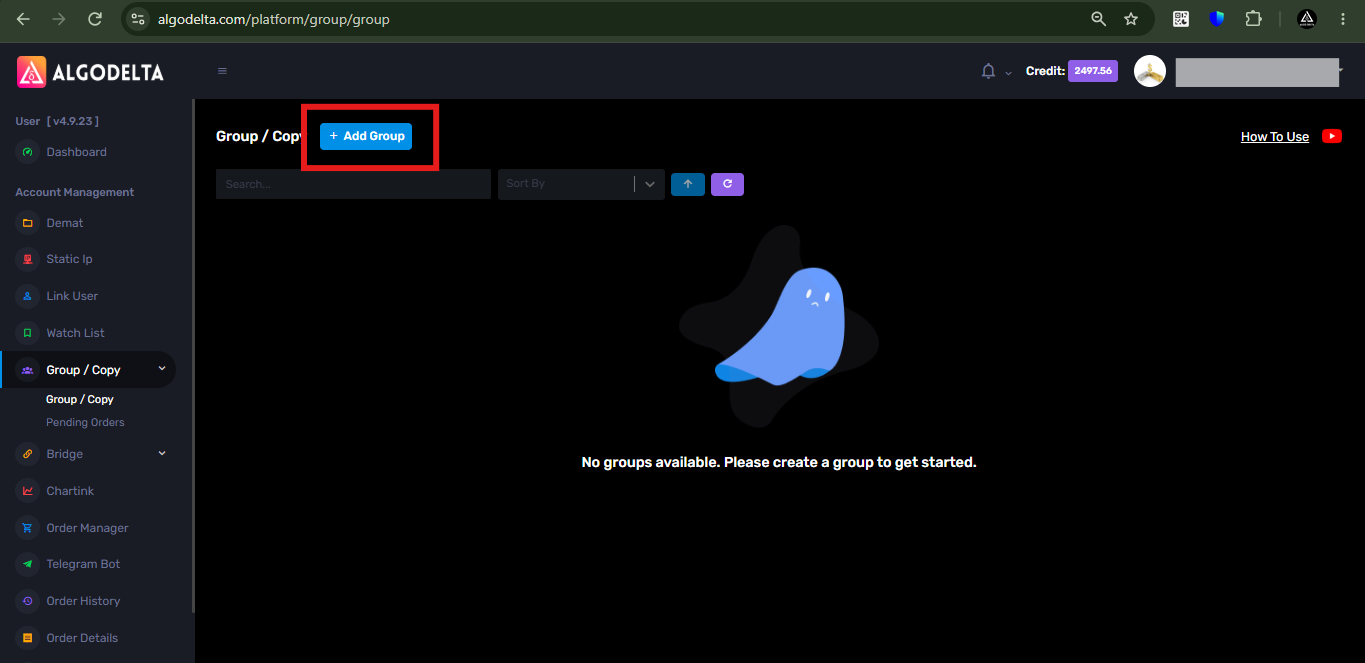
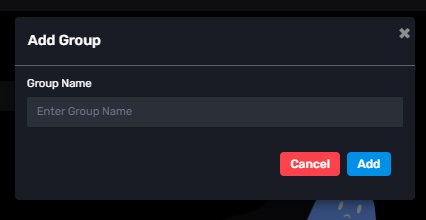
3) Now, you can add this group to any AlgoDelta feature, such as Copy Trading, TradingView, Order Manager, Chartink, or Watchlist, and start paper trading without placing real orders.
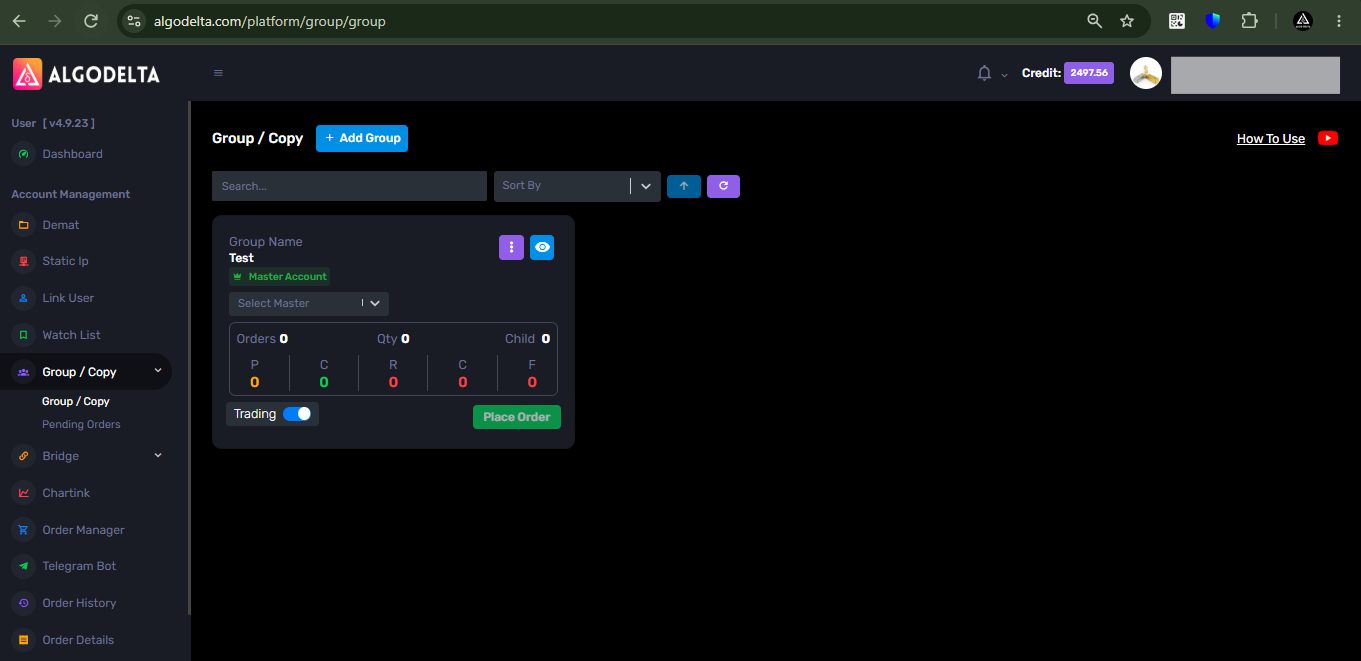 Keymaster
Yes, it is possible with the JSON Bridge, but the setup is slightly different compared to stocks and futures.
For stocks and futures, you can typically connect the strategy directly and create a single alert from the TradingView interface. However, options trading requires a more advanced setup because Call and Put executions need to be handled separately, additional conditions may be required in the strategy logic, and in some cases, minor modifications to the Pine Script may be necessary.
While it is definitely possible to automate option trading using the JSON Bridge, the exact configuration depends on how your strategy generates BUY and SELL signals.
Our technical team can help you configure the JSON syntax and TradingView alert setup according to your strategy requirements.
For detailed guidance, please contact the AlgoDelta Support Team. They can assist you with the complete setup and recommend the best approach for your specific strategy.
KeymasterYes, absolutely.
In fact, testing the syntax before going live is a good practice.
You can use the Simulation feature available inside the JSON Bridge.
Just follow these steps:
<h3>Step 1</h3>
Go to JSON Bridge → Generate SyntaxGenerate and copy your strategy order JSON.
<h3>Step 2</h3>
On the same page, you will find an option called:Simulation -> Open it.
<h3>Step 3</h3>
In the Webhook URL field, paste the webhook URL of your JSON Bridge.
<h3>Step 4</h3>
In the JSON field, paste the syntax that you generated previously.
<h3>Step 5</h3>
Click: Simulate
<h3>Step 6</h3>
Now go back to your JSON Bridge dashboard.If everything is configured correctly, you will be able to see the order execution inside the bridge itself.
=> After that you can use that strategy order syntax in the trading view alerts.
KeymasterYes, this is possible.
If the signal came before you connected the bridge, then the bridge will not know about that previous signal.
In that case:
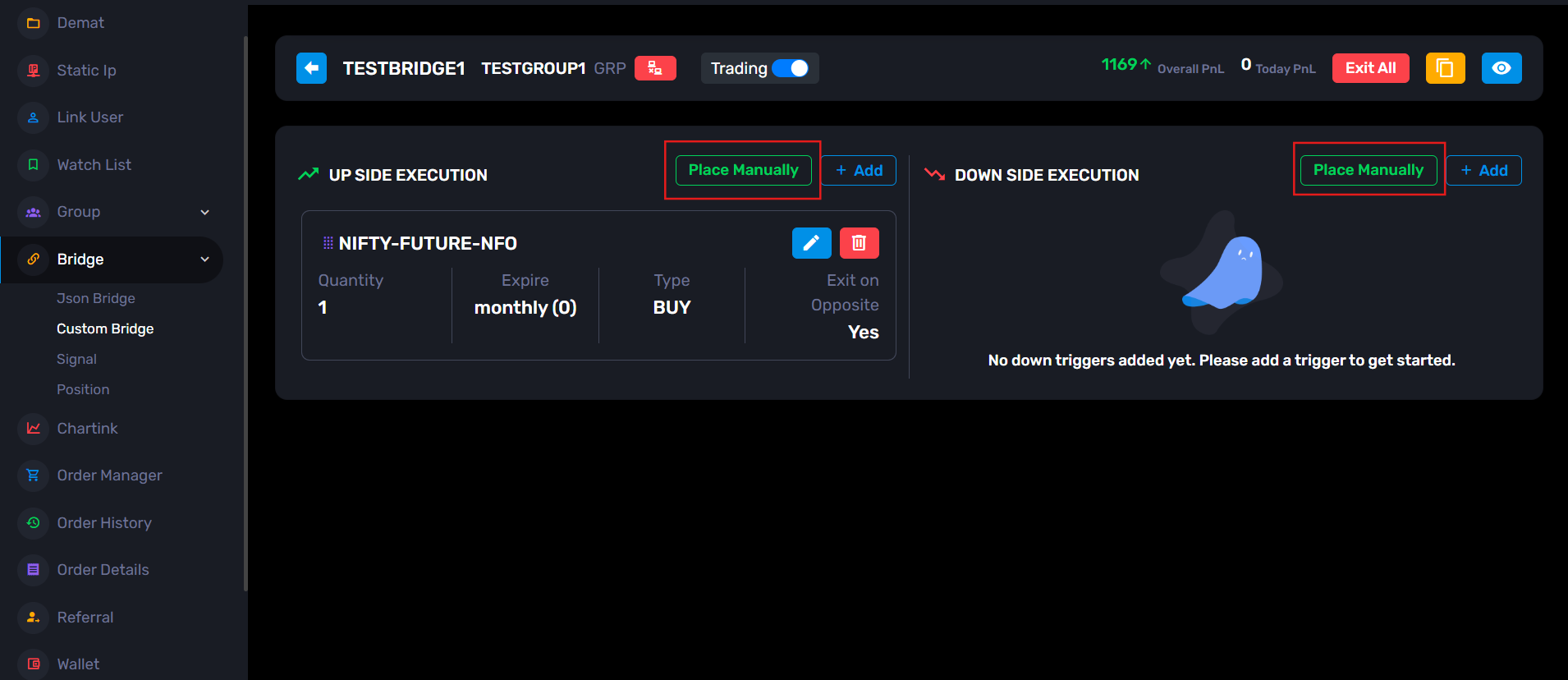
- First configure your Upside and Downside Execution properly
- Then open the Custom Bridge
You will find a button called: “Place Manually” using that button, you can place the trade directly from AlgoDelta.
After that: Your position gets opened ,the bridge remains active and future BUY/SELL signals from TradingView will be handled automatically.
- Order Type: Strategy Order
-
AuthorPosts