Home Forums General Questions How can I create a group in AlgoDelta?

How can I create a group in AlgoDelta?

  • Author
    Posts
    • I want to create a group in AlgoDelta, but I’m getting confused about the Master and Child account setup.

      Which account should I select as Master? Which one should be Child?

      And how do I create the group properly?

    • Don’t worry sir, the setup is quite simple and only takes a few clicks.

      Step 1 :

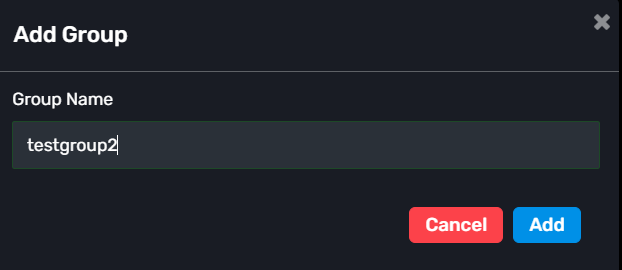
      Go to the Groups section and click: “+ Add Group”

      Enter any group name you want and create the group.
      Step 2 :

      Select a Master Account.

      You can choose any connected account as the Master account.
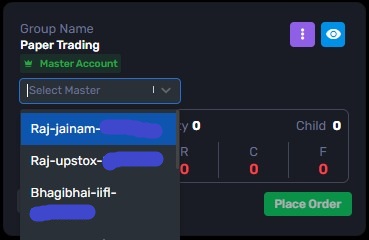
      If your account is not connected yet, connect the Demat Accounts section. You can refer this blog: Connect demat account

      Step 3 :

      After creating the group, click on the View option (eye icon).
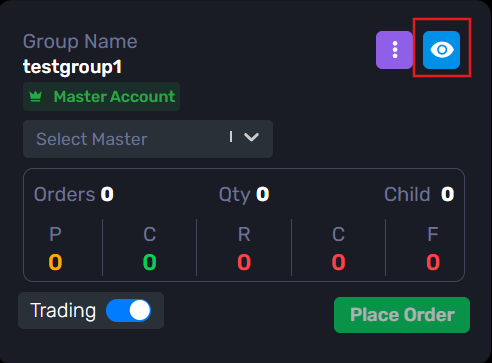
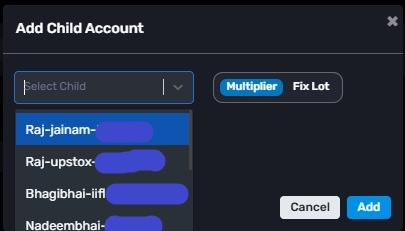
      Inside the group, click: “+ Add Child”

      Now select the accounts that you want to add as Child accounts.

      You can add one or multiple child accounts.
      Step 4 :

      Save the changes.

      That’s it.

      Now whenever you use this group in features like:

      -Order Manager
      -JSON Bridge
      -Custom Bridge

      the trades will automatically be executed in all the child accounts connected to that group.

      -> In simple terms, the Master account manages the setup, and the actual orders are placed in the Child accounts linked to the group.

      • Author↳ Replying to @Algodelta Support

        Thanks for the detailed explanation.

        They steps were too detailed and I can be able to create the group easily.

Viewing 1 reply thread
×

Start a Discussion

Get help from the AlgoDelta community.

×

Welcome Back!

Enter your email to sign in or create an account. No passwords needed.

Pending Approval

⚠️

Delete This?

Are you sure you want to delete this? This action is permanent and cannot be undone.

Scroll to Top
