
How can I execute hedged option with JSON Bridge?

Asked by Radhesh Joshi ·
1 reply 42 views Reply
Radhesh Joshi Original Post
Strategy Builder

I want to automate option trading using TradingView signals and AlgoDelta JSON Bridge. When a BUY signal comes, I want to sell a Put option and buy a hedge option. When a SELL signal comes, I want to sell a Call option and buy a hedge option.

How can I configure both legs using Order 1 and Order 2 and execute them through the BUY and SELL signals from my indicator?

So can anyone tell me the how to do this ?

Posted Oct 10
Reply

    1 Reply

    Support AlgoDelta
    Support AlgoDelta AlgoDelta Support ·

    Yes sir, you can execute hedged option trades using the Order 1 and Order 2 features in AlgoDelta JSON Bridge. Follow these steps:

    -Step 1: Configure the BUY Side
    Open JSON Bridge and configure the BUY side signal. In Order 1, configure the hedge leg for your Sell Put strategy.
    image

    Then configure Order 2 for the main Sell Put leg.
    image
    Once both orders are configured, copy the generated JSON array from the right-hand side.

    -Step 2: Configure the SELL Side

    Now configure the SELL side signal. In Order 1, configure the hedge leg for your Sell Call strategy.
    image

    Then configure Order 2 for the main Sell Call leg.
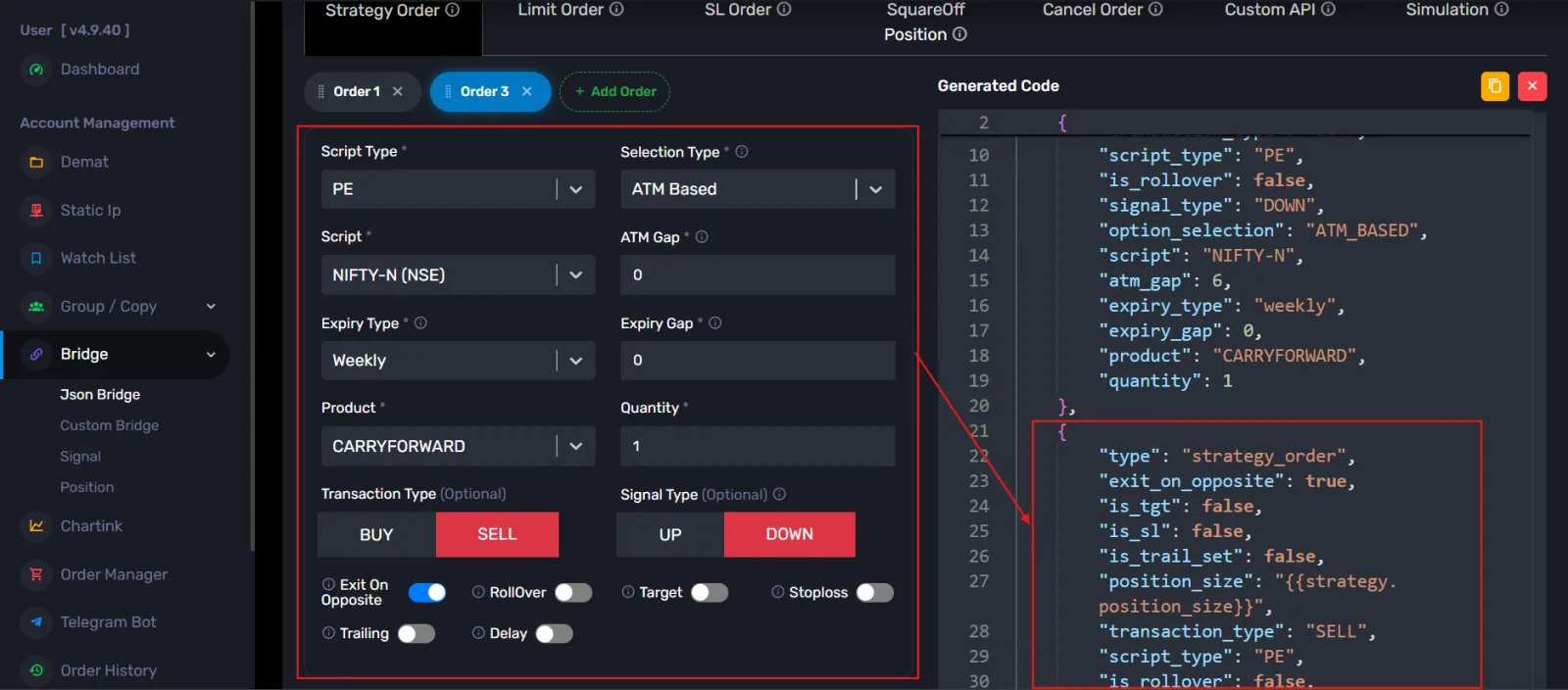
    image
    Copy the generated JSON array for the SELL side as well.

    -Step 3: Create TradingView Alerts
    Create two separate alerts in TradingView:
    BUY Alert -> Use the BUY-side JSON array.
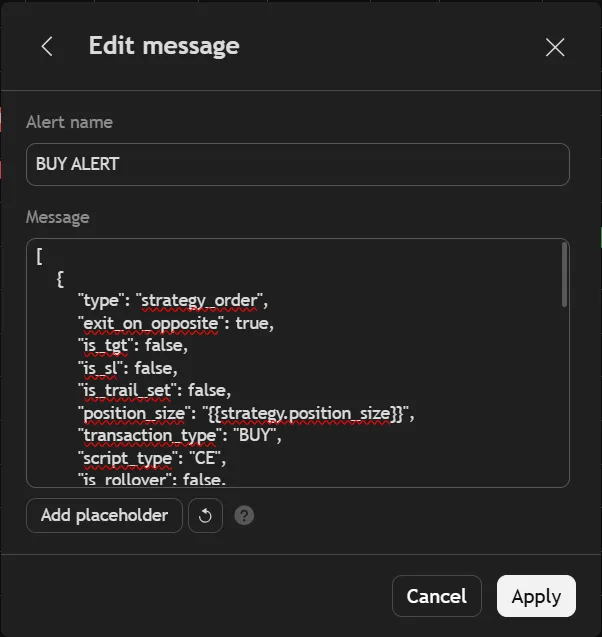
    image

    SELL Alert -> Use the SELL-side JSON array.
    image

    -Step 4: Execute Your Strategy
    Once both alerts are configured, AlgoDelta can process the corresponding orders when your indicator generates a BUY or SELL signal, according to your JSON Bridge configuration.

    This allows you to configure the hedge and main option leg for each signal and execute them through separate TradingView alerts.


      Markdown supported · ```json for code blocks · paste or drop screenshots

      Be specific and kind. Never share API keys, passwords or personal account details.

      Welcome to the community

      Log in or create your account in under a minute.

      1. 1Mobile
      2. 2E-mail
      3. 3Password
      +91

      Have a password?

      By continuing you agree to the community guidelines. We’ll send a one-time code by SMS.