
How can I temporarily disable trading without deleting my Bridge?
Radhesh Joshi Original Post
Strategy Builder
I’m currently using a Custom Bridge/JSON Bridge in AlgoDelta, but for a few days I don’t want any orders to be placed.
I also don’t want to delete the bridge because it’s already connected with my TradingView alerts and everything is configured properly.
Is there any way to temporarily stop order execution and enable it again later?
Posted Aug 3
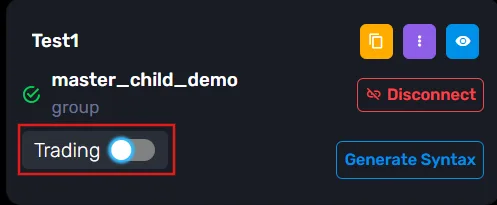
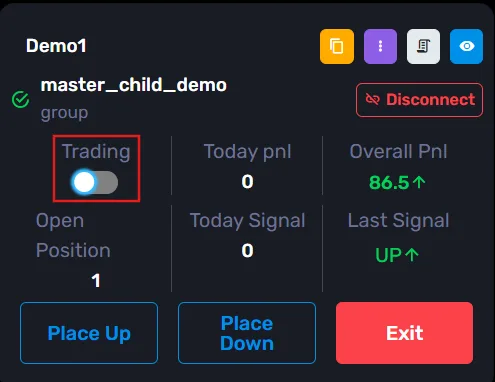
- Yes sir, you can do that very easily. There is no need to delete your bridge or recreate it later. Just follow the steps below: -Step 1: Open the Dashboard in AlgoDelta. -Step 2: Go to the Demat Accounts section where your broker account is connected. -Step 3: Locate the Trading toggle for the account. <img decoding="async" src="data:image/png;base64,iVBORw0KGgoAAAANSUhEUgAAAgAAAAEFCAYAAACVXV/UAAAAAXNSR0IArs4c6QAAAARnQU1BAACxjwv8YQUAAAAJcEhZcwAAEnQAABJ0Ad5mH3gAAGu3SURBVHhe7d15fFTV3fjxz0wmmaxDCCRkNyEJCQmLCfsOylbZHkBpoWJBtFKtS6VPtdpHH/3VBStWa1GsKK1afYoijyA+yCIoSwDZIeyBNAkJJCSEyUImmWR+f8ydZOZmsgdIMt/363WVOffcOzf33HvP955z7h1NSHisBSGEEEK4FK06QQghhBCdnwQAQgghhAuSAEAIIYRwQRIACCGEEC5IAgAhhBDCBUkAIIQQQrggCQCEEEIIFyQBgBBCCOGCJAAQQgghXFDbBgCaeiYhhBBCtCutCwCaWtE3NZ8QQgghboqWBQDOKnJ1Ja+enOUVQgghxC3R/ADAvuJWV/K2SWuxTup0dcUvQYAQQghxSzQ9ALCvvNUVutYCGutk0VqwaLBOdulOAwL1eoUQQghxUzQtAFDftddMSoWvBYsbWHSAG6BTJiXN4oY1T01A4KTilyBACCGEuGkaDwDUlbRS8Vsrf6XCdwN0loYnJZ9FW7u8BAFCCCHErdF4AGBjf9evsd7V21f8Fh1Y3C1Y9Kr – Radhesh Joshi Aug 3