
Home › Forums › MT4/MT5 Connection › How to connect an MT5 strategy with AlgoDelta’s JSON Bridge?
How to connect an MT5 strategy with AlgoDelta’s JSON Bridge?
-
AuthorPosts
-
-
I already have a strategy running in MT5.
What I want is that whenever a Buy or Sell signal comes from my MT5 strategy, the order should be executed through AlgoDelta using the JSON Bridge syntax.
For example, I want to trade Nifty Futures based on the signals generated by my MT5 strategy.
How can I set this up?
-
 Keymaster
Yes sir, you can definitely do that with AlgoDelta.
Just follow the steps below.
Step 1:
Go to:
Bridge -> JSON Bridge
Create a JSON Bridge if you don’t already have one.
Step 2:
Click on “Generate Syntax”.
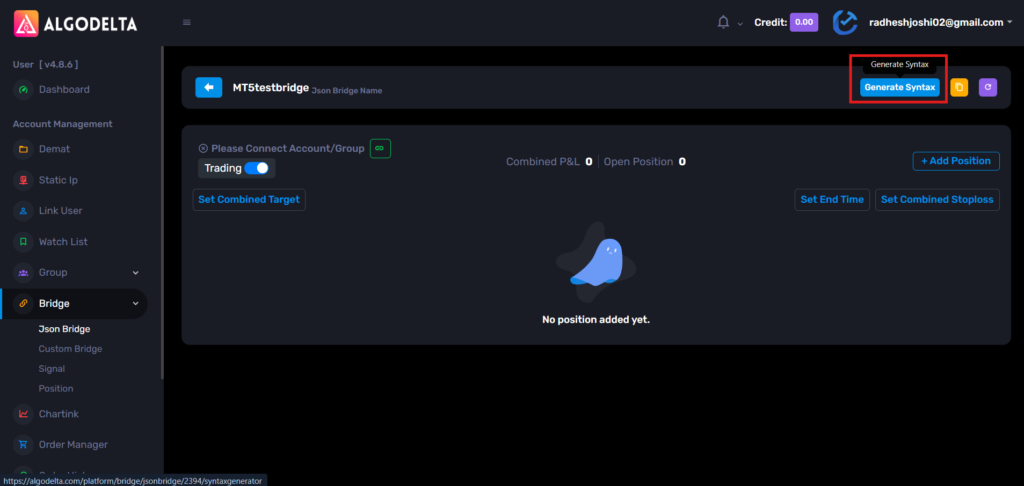
Now configure your Buy side order.
Example:
Script Type : Future
Script : NIFTY-N (NFO)
Expiry Gap : 0
Expiry Type : Monthly
Product : Carry Forward
Quantity : 1
Transaction Type : BUY
If you want the position to be closed automatically when an opposite signal comes, enable:
Exit On Opposite
You can also configure optional settings like:
-Rollover
-Target
-Stop Loss
-Trailing Stop Loss

Step 3:
Copy the generated syntax from the right side and save it somewhere.
This will be your BUY syntax.
Step 4:
Now generate another syntax for the SELL side.
Keep all settings the same except:
Transaction Type: SELL
Again, copy and save the generated syntax.
This will be your SELL syntax.

Step 5:
Copy the webhook URL from the JSON Bridge.

Step 6:
Now open MT5 and whitelist the webhook URL.
Go to:
Tools -> Options -> Expert Advisors

Enable:
Allow WebRequest for listed URL
Click on the green “+” button and paste the webhook URL.
Click OK.
Now the webhook URL is registered successfully.

Step 7:
Open your MT5 strategy code in MetaEditor and use the following function:
input string StrategyUrl = "URL";
void SendSignalToWebhook1(string signal_side)
{
   string longMessage =
"{\"type\":\"strategy_order\",\"exit_on_opposite\":true,\"is_tgt\":false,\"is_sl\":false,\"is_trail_set\":false,\"position_size\":\"{{strategy.position_size}}\",\"transaction_type\":\"BUY\",\"script_type\":\"FUT\",\"is_rollover\":false,\"script\":\"NIFTY-N\",\"expiry_gap\":0,\"expiry_type\":\"monthly\",\"product\":\"CARRYFORWARD\",\"quantity\":1}";


   string shortMessage =
"{\"type\":\"strategy_order\",\"exit_on_opposite\":true,\"is_tgt\":false,\"is_sl\":false,\"is_trail_set\":false,\"position_size\":\"{{strategy.position_size}}\",\"transaction_type\":\"SELL\",\"script_type\":\"FUT\",\"is_rollover\":false,\"script\":\"NIFTY-N\",\"expiry_gap\":0,\"expiry_type\":\"monthly\",\"product\":\"CARRYFORWARD\",\"quantity\":1}";

   string payload = "";
   if(signal_side == "UP")
      payload = longMessage;
   else if(signal_side == "DOWN")
      payload = shortMessage;
   else
      return;
   string headers = "Content-Type: application/json\r\n";
   char post[], result[];
   int timeout = 20000;
   StringToCharArray(payload, post, 0, StringLen(payload));
   ArrayResize(post, StringLen(payload));
   ResetLastError();
   int res = WebRequest( "POST",StrategyUrl,headers,timeout,post,result,headers);
   if(res == -1)
      Print("WebRequest Error: ", GetLastError());
   else
      Print("Webhook Response: ", CharArrayToString(result));
}
Step 8:
Replace:
-StrategyUrl with your JSON Bridge webhook URL
-longMessage with your generated BUY syntax
-shortMessage with your generated SELL syntax
Step 9:
Now call the function wherever your Buy or Sell condition becomes true.
Example Buy Signal:
if(buySignal && posType != POSITION_TYPE_BUY)
{
   SendSignalToWebhook1("UP");
   // Existing Buy Logic
}
Example Sell Signal:
if(sellSignal && posType != POSITION_TYPE_SELL)
{
   SendSignalToWebhook1("DOWN");
   // Existing Sell Logic
}
That’s it.
Now whenever your MT5 strategy generates a Buy signal, the BUY JSON syntax will be sent to AlgoDelta and the configured Futures order will be executed.
Similarly, whenever your strategy generates a Sell signal, the SELL JSON syntax will be sent, and the corresponding Futures order will be executed automatically through the JSON Bridge.
-
I understand it fully with your very detailed explanation and with the image’s demonstration. Thanks for explaining in such detailed.
-
-
-
AuthorPosts

