Yes, definitely.
You can do this using either:
-Order Manager
-JSON Bridge
Both support automatic position exit based on time.
For this example, I’ll show it using Order Manager.
Step 1 : Go to the Order Manager.
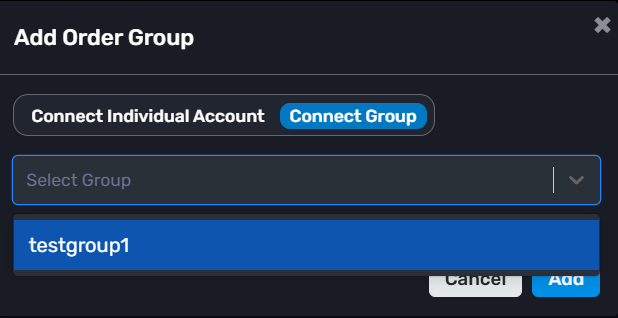
Click: “+ Add Order Group”
If you don’t have a group already, create Group first and select it or you can connect the individual account also.
Step 2 : Click: “+ Add Position”
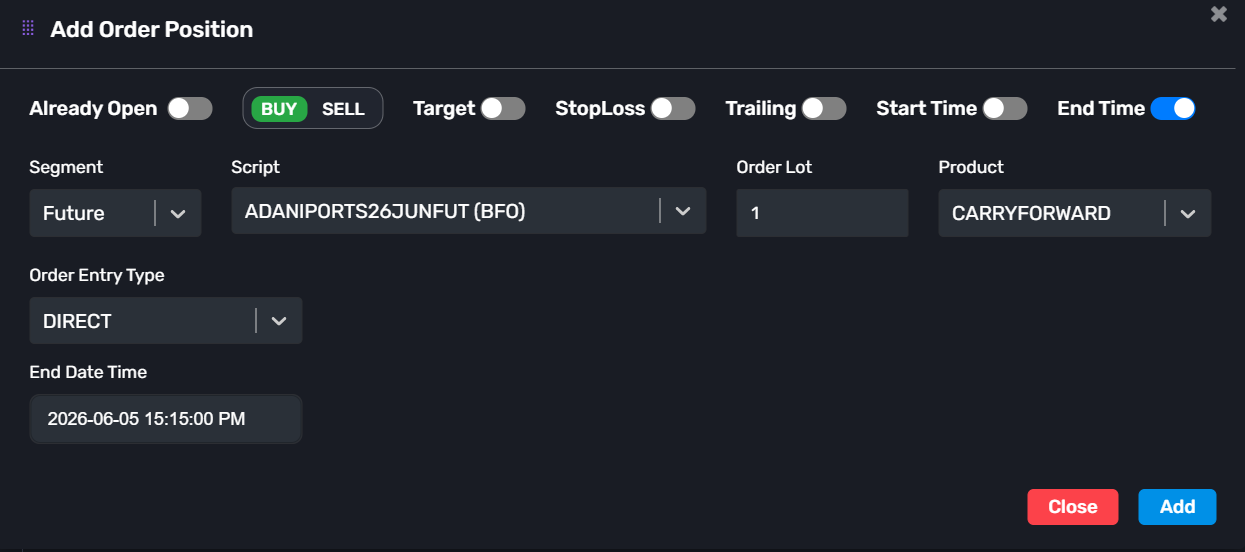
Now configure your trade.
-> Example:
-Already Open: Disable
-Transaction Type: Buy
-Segment: Future
-Script: ADANIPOWER26JUNFUT
-Order Lot: 1
-Product: Carry Forward
-Order Entry Type: Direct
Step 3 :
Enable the end time filed at the right upper of the pop up.
-End Time: 15:15:00
You can also configure:
-Start Time
-Target
-Stop Loss
-Trailing Stop Loss
Then click Add.
That’s it.
When the configured End Time is reached, AlgoDelta will automatically exit the position for you.
So if you set the End Time to 3:15 PM, the trade will be closed before the broker’s auto square-off process starts.
-> This is very useful for intraday traders who don’t want to manually monitor and exit positions every day.
Note : Orders will only be managed in the child accounts connected to the selected group.



